Features

Make features

Make has everything you need to easily create sophisticated marketing campaigns.

Newsletter

Build your brand and improve communication with newsletters

Make makes it easy to create, distribute, and measure the impact of your newsletters.

Newsletter example

User-friendly editor

Our intuitive editor allows you to design sophisticated campaigns quickly.

User-friendly editor

Our intuitive editor allows you to design sophisticated campaigns quickly.

User-friendly editor

Our intuitive editor allows you to design sophisticated campaigns quickly.

Custom sender domain

Send from your own domain and improve your sender reputation to ensure email delivery.

Custom sender domain

Send from your own domain and improve your sender reputation to ensure email delivery.

Custom sender domain

Send from your own domain and improve your sender reputation to ensure email delivery.

Detailed statistics

Get a complete overview of performance and how to optimize your campaigns.

Detailed statistics

Get a complete overview of performance and how to optimize your campaigns.

Detailed statistics

Get a complete overview of performance and how to optimize your campaigns.

SMS

Effective customer engagement with SMS marketing

Need to get a message out now? With Make, you can send thousands of messages in a matter of minutes.

Personalization using merge tags

By using merge tags, you can easily personalize your messages.

Personalization using merge tags

By using merge tags, you can easily personalize your messages.

Personalization using merge tags

By using merge tags, you can easily personalize your messages.

Unique password and unique number

Receive incoming messages using keywords or a dedicated number.

Unique password and unique number

Receive incoming messages using keywords or a dedicated number.

Unique password and unique number

Receive incoming messages using keywords or a dedicated number.

Statistics

A complete overview of who has received your text messages at any given time.

Statistics

A complete overview of who has received your text messages at any given time.

Statistics

A complete overview of who has received your text messages at any given time.

Segmentation

Send targeted newsletters and SMS with segmentation

Segmentation divides your contacts into smaller target audiences based on custom criteria.

Groupings based on personal data

Groups based on statistical data

Groupings based on "and/or" rules

Automation

Automate your workflows to free up valuable time

Set up automated workflows to reach the right contact at the right time.

User-friendly editor

Automated email or SMS dispatch

Automatically update contact data

Dynamic content

Dynamic content targeting in newsletters

Easily define which content is presented to specific contacts.

Content based on personal data

Content based on "and/or" rules

Time savings with dynamic messaging

RSS content feed

Use RSS content feeds to build newsletters

Feed news, products, concert dates, and other content directly into your newsletters with RSS.

Content is automatically retrieved from your website

Draft being created

Newsletter sent

Integrations

Synchronize contact data with your systems

Create targeted campaigns and automation sequences using the data already available in your CRM.

Merge data into newsletters and SMS

Sync data back to your CRM system

Save time and avoid duplicate work

Functions

Email API

Email API developed in Norway

With our Email API, you can easily and quickly integrate email into your software.

Send emails at scale

Sends from IP addresses and servers in Norway

Fast delivery of time-sensitive messages

SMTP server

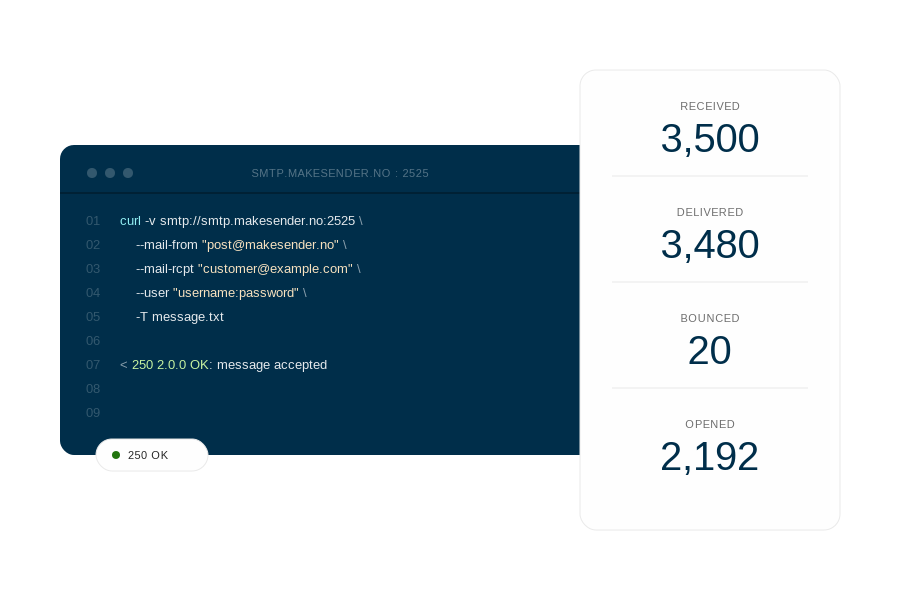
An SMTP server that reaches the inbox

With our SMTP server, you can quickly and easily reach your customers to ensure they receive relevant information without delay.

Secure communication with STARTTLS

Sends from IP addresses and servers in Norway

Fast delivery of your time-sensitive messages
You are in good company

We handle more than 700 million annual newsletter deliveries for our users. These are some of the companies that choose to use Make.

ADBC logo
ADBC logo
Willumsens Museum logo
Vejle Kunstmuseum logo
Roskilde Kommune logo
Punktum logo
Punktum logo
Museum Ordrupgaard logo
Munkeruphus logo
Munkeruphus logo
Louisiana logo
Louisiana logo
Louisiana logo
K7 logo
K7 logo
K7 logo
Hvidovre Kommune logo
Husets teater logo
Husets teater logo
Glyptoteket logo
Glyptoteket logo
Glyptoteket logo
GHg logo
GHg logo
Datatilsynet logo
Datatilsynet logo
Datatilsynet logo
ODM Danske Museer logo
Dansk Komponist Forening logo
Ballerup Kommune logo
Arken logo
Arken logo
Arken logo
Helsedirektoratet logo
Tek Norge logo
Tek Norge logo
OverOslo logo
OverOslo logo
OverOslo logo
Digdir logo
Digdir logo
Kulturdirektoratet logo
NTNU logo
NTNU logo
Bring logo
Bring logo
Universitetet i Oslo logo
Oslo universitetssykehus logo
Tons of Rock logo
Tons of Rock logo
Tons of Rock logo
NHO logo
NHO logo
NHO logo
Norsk filminstitutt logo
Deichman logo
Deichman logo
LO Norge logo
LO Norge logo
Equinor logo
Equinor logo
Equinor logo
Helthjem logo
Helthjem logo
Arendalsuka logo
Arendalsuka logo
Avinor logo
Avinor logo
Avinor logo
DNB logo
DNB logo
DNB logo
Oslo kommune logo
Oslo kommune logo
SpareBank 1 logo
SpareBank 1 logo
SpareBank 1 logo
NRK logo
NRK logo
NRK logo
Sopra Steria logo
Sopra Steria logo
Forskning.no logo
Forskning.no logo
Aleris logo
Aleris logo
Aleris logo
Rema 1000 logo
Rema 1000 logo
Rema 1000 logo
Fagforbundet logo
Fagforbundet logo
Morgenbladet logo
Morgenbladet logo
Røde Kors logo
Røde Kors logo
Røde Kors logo

Frequently asked questions about features

Find answers to frequently asked questions about the features in Make. You can also find more information by clicking on each individual feature.

William Øberg

William Øberg

Chief Commercial Officer

Schedule a demo

Let us take you through Make and explain how the system works, with no obligation.

Prefer email?

William Øberg

William Øberg

Chief Commercial Officer

Schedule a demo

Let us take you through Make and explain how the system works, with no obligation.

Prefer email?

William Øberg

William Øberg

Chief Commercial Officer

Schedule a demo

Let us take you through Make and explain how the system works, with no obligation.

Prefer email?

Frequently asked questions about features

Find answers to frequently asked questions about the features in Make. You can also find more information by clicking on each individual feature.

Can I send both newsletters and SMS with Make?

Yes. You can plan, send, and measure both newsletters and SMS from Make. The channels can be used individually or combined in the same customer journey.

How does contact segmentation work?

You can build target audiences based on contact data, activity, and statistics, and combine multiple rules with "and/or". The segments are updated automatically when the contact data changes.

What can I automate with Make?

You can set up automated workflows that trigger based on events such as a registration, a specific date, or a change in contact data. The workflow can send emails and SMS, include delay steps, and update the contact details along the way.

Can the content be tailored to each individual recipient?

Yes. With merge fields and dynamic content, you can tailor text, images and messaging based on the recipient's data, interests or segment, without creating a separate send-out for each target group.

Can Make be integrated with the systems we already use?

Yes. Make can be integrated with CRM, membership, booking, e-commerce, and publishing systems, among others. Data can be synchronized both ways, reducing manual work and keeping contact information up to date.

Does Make offer API and SMTP for transactional messages?

Yes. You can send time-critical and transactional emails through Make's email API or SMTP server. The solution uses Norwegian infrastructure and provides statistics on reception, delivery, and bounces.

Frequently asked questions about features

Find answers to frequently asked questions about the features in Make. You can also find more information by clicking on each individual feature.