Blog
How to succeed with
email marketing
Newsletters and SMS are among the most effective channels for building relationships and driving sales. Learn how to create engaging content, increase open rates, and reach your target audience.
Search...

Get more out of Make with a tailored workshop
In short: In a workshop lasting about four hours, you work alongside two specialists from Make to get more value out of newsletters, segmentation, and automation. The content is tailored to your goals, combining advice and best practices with hands-on work directly in Make. Afterwards, you receive a summary with specific action points. The workshop can be held digitally or at your offices, and costs NOK 18,000 excl. VAT. Travel expenses are additional for in-person sessions.
Looking to work smarter with email communication and customer journeys? In a workshop with Make, we help you make the most of the platform, improve your communication, and identify practical steps that fit your business.
Getting started with sending newsletters is often straightforward, but are you using all available features? Perhaps you want to automate more tasks, work more purposefully with customer data, or find out what actually drives results.
In a workshop, we combine professional guidance, best practices, and hands-on work in Make. The content is tailored to your needs, giving you practical tips and solutions you can put to work right away.
How can we help you?
No two businesses have the same requirements. That is why we adapt the workshop to what you want to achieve. Here are some of the areas we can focus on:
1. Strategy and optimization
Gain better insight into what works and how you can improve your email communication.
Review of existing newsletters and performance
A/B testing and send-time optimization
Insights into subscriber engagement and behavior
Best practices for content, design, and deliverability
Right plan type and next steps
2. Segmentation and personalization
Make your communication more relevant by sending the right message to the right recipient.
Structuring contact lists and segments
Better use of existing customer data
Personalization and dynamic content
Forms and profile pages for collecting relevant details
3. Automation and customer journeys
Save time on manual tasks and deliver relevant communication throughout the entire customer journey.
Mapping key customer journeys
Automated welcome series and follow-ups
Automation based on customer data, actions, or timing
Combining email and SMS
We can also look into integrations and how data from other systems can be used in Make.
How does a workshop work?
A workshop typically lasts about four hours and is led by two specialists from Make.
1. In advance: Scoping and preparation
We start with a brief meeting to map out your needs, challenges, and goals. This allows us to tailor the agenda and prepare relevant examples.
2. Workshop: Guidance and hands-on work
We combine consulting and best practices with hands-on work directly in Make. Together, we look at opportunities, practical solutions, and how you can implement them.
3. Summary and next steps
After the workshop, you receive a summary of what we covered, complete with recommendations and concrete action items for your team.
The workshop can be delivered digitally or on-site. We are happy to visit your offices if that suits you best.
What does a workshop cost?
A four-hour workshop with two specialists costs NOK 18,000 excl. VAT.
The price includes preparation, customization to your needs, and delivery with two specialists from Make. Any travel expenses and travel time will be added for on-site delivery.
Pricing is adjusted according to desired duration and number of specialists.
Ready to get more out of Make?
Whether you want to refine existing newsletters, get started with automation, or explore new opportunities, we are here to help.
Get in touch for an informal chat about how we can tailor a workshop to your needs.
Karine Brevik
Customer Success Manager
karine@make.as
+47 930 05 964Read more

Email API for developers – send transactional email with Make Sender
In short: Make Sender API is a REST API for transactional email. You send JSON over HTTPS to https://api.makesender.no/api/v1/ and authenticate using Basic Auth. You can use templates from Make, merge data per recipient, attach files, manage lists, contacts, and suppression lists, and receive events such as delivered, opened, and bounced back via signed webhooks. The service offers Norwegian support, is operated in Norway, and data is stored in Oslo.
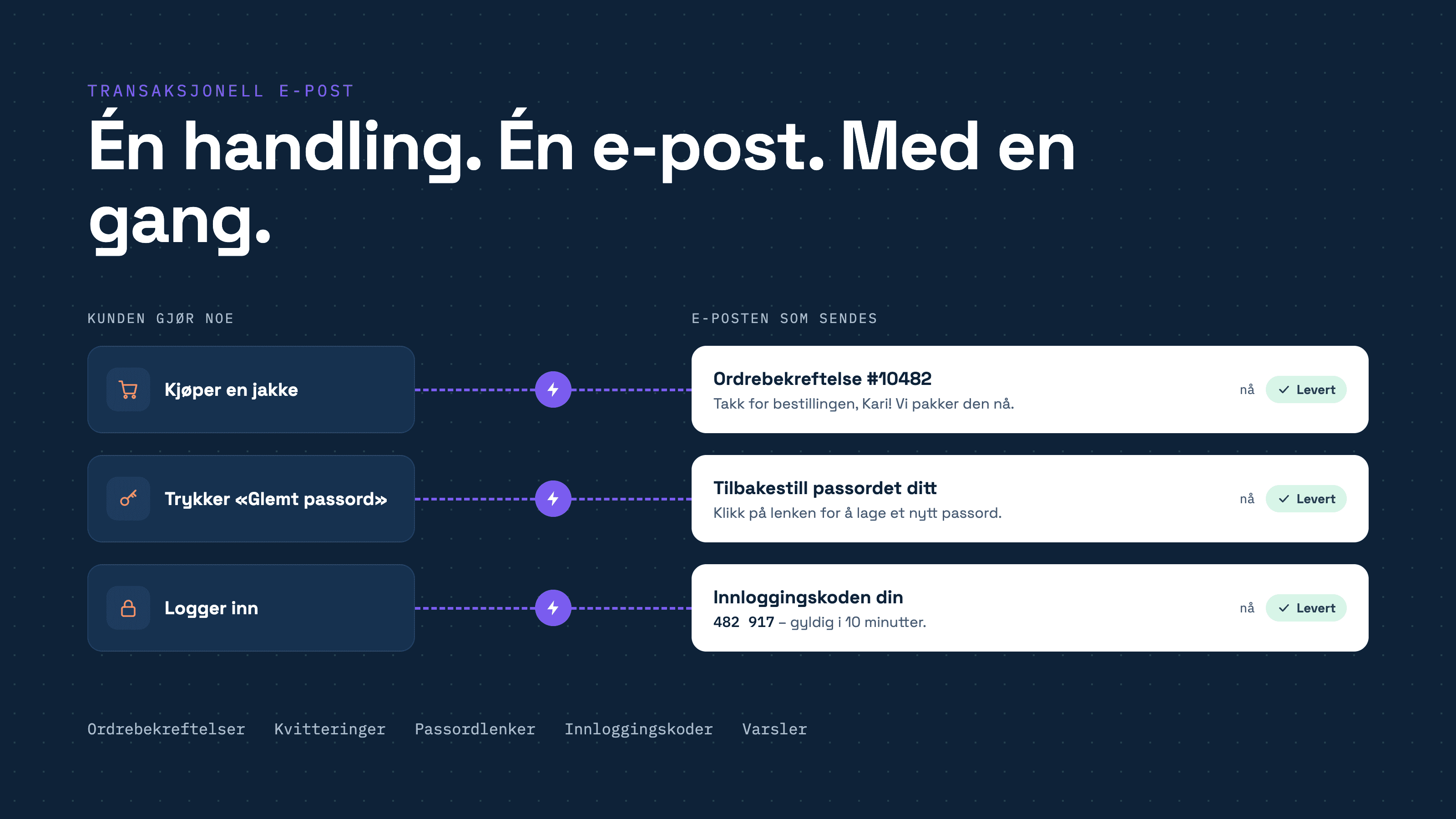
Order confirmations, password links, login codes, and alerts must arrive, and they must arrive now. With Make Sender API, you send them directly from your code, without operating your own email server, building IP reputation, or handling bounces and blocklists yourself.
Here you will find an overview of the API's capabilities, its structure, and what you need to set up before your first call.
Why use an email API?
Sending email is easy. Getting it delivered to the inbox is more difficult. A new server with no history is easily suspected of spam, and large volumes require queuing, retries, and handling of bounces and spam complaints. With Make Sender API, Make handles delivery, providing you with a simple interface to send against.
You integrate, the marketing department owns the content
Templates are created in the Make editor. You only send the template name and the data to be merged. If the marketing department wants to change the text or design of the order confirmation, they do it themselves in Make, without you having to deploy anything.
How the API is structured
REST and JSON. All requests and responses are JSON (
Content-Type: application/json). The exception is attachments, which are sent asmultipart/form-data.Basic Auth. The username is your API username, and the password is the API key. You create both in your account settings.
Common address. All endpoints are located under
https://api.makesender.no/api/v1/.Five sections: Messages, contact lists, contacts, suppression lists, and webhooks.
Endpoints
Messages
Endpoint
Function
POST /{domain}/messagesSends an email. Returns
201 Createdonce the message has been received and queued.Key parameters:
Parameter
Usage
from,toRequired. Supports display names. Separate multiple recipients with commas; duplicates are removed automatically. The
fromaddress must belong to a verified domain.subject,text,htmlThe content of the email. You can omit
subjectif the template has a predefined subject.templateThe name of a template in Make.
html,text, andsubjectoverride the template if sent with the request.t:variablesTemplate variables. JSON containing data to be merged into the template.
recipient-variablesJSON with specific data per recipient, for batch sending with personalized content.
v:{name}Custom data attached to the message.
o:tracking,o:tracking-opens,o:tracking-clicksEnables or disables tracking for this specific message.
reply_toReply-to address.
attachment,inlineAttachments and inline images for the HTML. Maximum of 10 files and 18 MB in total.
Templates support the Liquid template language, allowing you to use conditionals and loops, rather than just basic placeholders like
{{ name }}.You can merge recipient-variables into the template-variables.
All parameters are sent within the request itself. Prefixes indicate the field's function: t: for template data, v: for custom variables, and o: for settings. If you send via SMTP instead, you set these details as X-Make-headers.
Contact lists
Endpoint
Function
GET /listsRetrieves all lists.
GET /lists/{id}Retrieves a single list using its ID or alias.
POST /listsCreates a list.
PUT /lists/{id}Updates a list.
DELETE /lists/{id}Deletes a list and all associated contacts.
Each list has an alias address. If you send to this alias, each contact on the list receives their own copy.
Contacts
Endpoint
Function
GET /lists/{list}/recipientsRetrieves contacts from a list.
GET /lists/{list}/recipients/{email}Retrieves a single contact.
POST /lists/{list}/recipientsAdds one or multiple contacts in a single call.
POST /lists/{list}/recipients/importBulk import from CSV, XLS, XLSX, or JSON as a file or raw body, max 5 MB.
PUT /lists/{list}/recipients/{email}Updates custom fields on a contact.
DELETE /lists/{list}/recipients/{email}Removes a contact from the list.
Each contact can have personalized fields in
custom_fields, such as name and company, which are merged into the templates.Suppression list
The suppression list applies account-wide across all lists. Make never sends to addresses on this list. Each entry has a
statuscode:bounce,complaint, orunsubscribe.Endpoint
Function
GET /suppressionsRetrieves the entire suppression list.
GET /suppressions/{email}Checks a single address.
POST /suppressionsAdds one or multiple addresses in a single call.
POST /suppressions/importBulk import from CSV, XLS, XLSX, or JSON, max 5 MB. Useful when importing a suppression list from a previous provider.
DELETE /suppressions/{email}Removes an address from the suppression list.
Webhooks
Webhooks are configured under Settings → Webhooks in Make, not via the API. You can set up to 16 endpoints. Each endpoint must use HTTPS and can apply to all domains or just one.
Event
Trigger
acceptedThe message has been received and queued.
deliveredDelivered to the recipient's email server.
permanent_failHard bounce.
temporary_failSoft bounce. Make automatically retries delivery.
openedOpened. Requires open tracking.
clickedClicked. Requires click tracking.
complainedMarked as spam (feedback loop).
Format:
POSTwith JSON containing two parts:signatureandevent-data.Signing: HMAC-SHA256 of
timestampandtoken, using the signing key from your settings. Reject old timestamps and tokens you have previously processed.Correlation: The
job-idin the payload matches theX-Job-IDheader, allowing you to link the event with your own system data.Retries: Respond with a 2xx status code within 10 seconds. Failed deliveries are retried up to 6 times. The endpoint is disabled after 25 consecutive failures.
Idempotency: The same event may be received multiple times and out of order. Deduplicate using
idand sort bytimestamp.Testing: The "Send test notification" button sends sample webhooks containing the header
X-Webhook-Test: true.
Limits and error handling
Topic
Value
Rate limit
200 requests per minute per API key. Returns
429when the limit is reached. Use exponential backoff.Pagination
pageandper, maximum of 100 per page.Attachments
Maximum of 10 files and 18 MB in total per message.
Import
Maximum of 5 MB per request.
401Invalid username or API key.
422Validation error, such as an unverified domain or excessively large attachments.
Getting started
Get access. The Make Sender API is available to all paying customers. Choose a subscription based on your monthly volume.
Create a subdomain. For example,
send.example.com. Never configure DNS records on your root domain, as the MX record will disrupt your regular email flow.Add the DNS records from the table below, then click "Verify" in Make.
Create an API key in your account settings. Store it in an environment variable or secret manager; never expose it in client-side code or repositories.
Set up webhooks under Settings → Webhooks if you need delivery status updates in your own system.
Send your first message using
POST /{domain}/messages, and verify that you receive a201 Createdstatus.
DNS records for the subdomain
Record
Name
Value
SPF (TXT)
send.example.comv=spf1 mx include:_spf.makesender.no ~allDKIM
make1._domainkey.send.example.comUnique value per domain, retrieved in Make
MX
send.example.com10 mxa.makesender.no.The MX record ensures that bounce messages return to Make, keeping your suppression list updated.
API or SMTP?
If you simply need to point an existing system to an SMTP server, Make Sender SMTP is quicker to set up. The API offers broader functionality: code-controlled lists, contacts, suppression lists, flexible batch sending, and structured responses. Both options route through the same delivery engine.
Delivery and operations
Established reputation. Make sends from IP addresses with strong history and from Norwegian servers well-regarded by ISPs.
Monitoring. Delivery rates, blocklists, and feedback loops are continuously monitored.
Automated suppression list. Hard bounces and spam complaints are added automatically without manual effort.
Dedicated IP. High-volume senders can obtain a dedicated IP address to build their own sender reputation.
Logs. View status, error codes, and SMTP responses for each message directly in Make.
Privacy and data storage
Make is a Norwegian company that stores customer data on servers in Oslo, avoiding US-based cloud providers. Make acts as the data processor. The sender is responsible for ensuring the legal basis for contacting recipients.
Support
Access support in Norwegian from specialists who understand both email delivery and the API, rather than chatbots or outsourced ticket systems.
Areas we assist with
DNS setup. Make helps you configure subdomains, SPF, DKIM, and MX correctly, ensuring domain verification is completed.
Technical advice. Receive guidance on integration, batch sending, webhooks, and the optimal use of templates and lists.
Troubleshooting. If an email fails to deliver, support will review status codes, error codes, and SMTP responses with you.
Developer communication. Support can coordinate directly with your development team when required.
Need assistance or have questions?
Phone: +47 21 64 00 10
Email: support@make.as
Chat: within Make
Help center: support.make.as
System status: status.make.as.
Frequently asked questions
How do I authenticate with the Make Sender API?
→ Using HTTP Basic Auth. The username is your API username, and the password is your API key. Both are generated in your Make account settings.What format does the API use?
→ JSON over HTTPS. The exception is messages with attachments, which must be sent asmultipart/form-data.What is the rate limit for the Make Sender API?
→ 200 requests per minute per API key. Exceeding this returns a429 Too Many Requestsstatus.Can I use templates from Make when sending via the API?
→ Yes. Provide the template name in thetemplateparameter and variables int:variables. Templates support Liquid, allowing conditionals and loops.How do I send the same email to multiple recipients with personalized content?
→ Pass multiple addresses in thetofield, and include individual recipient data inrecipient-variables. Alternatively, you can send to a list where contacts have custom fields.How do I feed delivery statuses back into my own system?
→ Configure webhooks under Settings → Webhooks in Make to receive events likedelivered,permanent_fail,opened,clicked, andcomplained.How do I verify that a webhook is sent by Make?
→ Each payload is signed with an HMAC-SHA256 signature generated from thetimestampandtoken, using your signing key. Compare this with thesignaturefield and reject outdated timestamps.Can I import a suppression list from another provider?
→ Yes. UsePOST /suppressions/importwith a CSV, Excel, or JSON file up to 5 MB.Where is data stored?
→ On servers located in Oslo. Make is a Norwegian company and does not use US cloud providers.Is Make Sender an alternative to Mailgun, SendGrid, and Postmark?
→ Yes. Make Sender addresses the same transactional email requirements, combined with Norwegian data storage and support.Resources
Read more

SMTP server for e-commerce and business systems – deliver your emails with Make Sender SMTP
In short: Make Sender SMTP is a service that sends automatic emails from your online store, website, or business system, such as order confirmations, receipts, and password reset links. You simply enter a few settings in the system you already use, and Make handles the rest. You can use templates from Make, send to your own contact lists, monitor delivery, and your data is stored on servers in Norway.
Almost all online stores, content management systems, and business platforms have a field called "SMTP server". This is where you specify who should send the automated emails on your behalf.
If you choose the wrong provider, emails may end up in spam or not be delivered at all. Below you will learn what an SMTP server does, why it pays to use a dedicated service, and how to get started with Make.
What is an SMTP server?
SMTP is the standard protocol used to send email across the internet. An SMTP server acts as the post office that receives email from your system and delivers it to the recipient.
When you use Make Sender SMTP, your system sends the email to Make, and Make ensures it reaches the inbox.
Why not send emails yourself?
While you can set up your own email server, maintaining it requires significant effort.
Reputation. Gmail and Outlook do not trust unknown senders. A new server with no sending history is easily flagged as spam, regardless of your content.
High volumes. When sending many emails at once, such as during a sale, everything must be delivered quickly and without errors.
Blocklists. If your server ends up on a blocklist, someone must detect it and resolve the issue quickly.
Security. Servers require ongoing updates and 24/7 monitoring.
Unsubscribes and invalid addresses. These must be handled correctly, also for GDPR compliance.
Make handles all of this for you.
Can I use the email service from my web host?
Often, no. The email service provided by many web hosts is designed for personal email, not for automated emails sent from a website or system. Domeneshop recommends that their customers use a dedicated provider for automated mailings, and highlights Make as one of two Norwegian alternatives.
How to get started
Get a subscription. Make Sender SMTP is available to all paying customers. Choose a plan that covers your monthly email volume.
Create a subdomain and add DNS records. Create a subdomain, for example send.example.com, and add it to Make. Provide the DNS records in the table below to your domain administrator. Never add these records to your main domain, as this may disrupt your regular email services.
Verify the domain. Click "Verify" in Make once the records have been added.
Create an SMTP user. Set up an SMTP user in your account settings to receive a user ID and password.
Enter the settings in your system. Locate the SMTP fields in your online store or system and enter the values from the table below.
Test. Send a test email to yourself and verify in Make that it was delivered.
Settings for your system
Field
Value to enter
SMTP / host
smtp.makesender.no
Port
2525 or 587
Encryption
STARTTLS (may also be called TLS)
Username
The user ID for your SMTP user
Password
The password for your SMTP user
DNS records to add to your subdomain
Record
Name
Value
SPF
send.example.com
v=spf1 mx include:_spf.makesender.no ~all
DKIM
make1._domainkey.send.example.com
Unique value for each domain, found in Make
MX
send.example.com
10 mxa.makesender.no.
What do these records mean?
SPF informs recipients that Make is authorized to send email on behalf of your domain.
DKIM is a digital signature verifying that the email actually originates from you and has not been altered in transit.
MX ensures that bounce messages, such as when an address does not exist, are routed to Make so the suppression list can be kept up to date.
Switching from another provider
Switching is straightforward and involves no downtime.
Add Make's DNS records to a subdomain.
Change the SMTP server in your system to smtp.makesender.no.
Update the user ID and password to the ones provided by Make.
Make increases volume gradually at first to help email providers get used to the new sender.
Templates and personalization
With Make Sender SMTP, you can use templates created in the Make editor without needing to use the API. Your system sends the template name along with the data to be merged, such as names and order numbers, and Make assembles the email before sending.
This allows you to update the text and design of your order confirmations or welcome emails directly within Make. The person who configured your system only needs to link it to the correct template once.
You can also disable tracking for opens and clicks on emails where tracking is not appropriate.
Send to lists
With Make Sender SMTP, you can send to an entire list of recipients, not just one by one. This is useful for system status updates, terms of service changes, or general member communications.
Each list receives its own email address, such as newsletter@makesender.no. When you send an email to that address, Make sends an individual copy to every recipient on the list.
Troubleshooting
Incorrect username or password. Ensure you are using the correct user ID and password for the SMTP user, and that the user is active in Make.
No connection to the server. Verify that you are using port 2525 or 587, and that your firewall is not blocking the traffic.
Domain not verified. Check that the subdomain has been verified in Make.
Encryption error. Select STARTTLS. Do not select SSL on port 465.
Email is too large. Keep each email under 25 MB, including attachments.
If you need further assistance, Make's support team is ready to help.
SMTP or API?
SMTP is best when your system already has a designated SMTP server field, allowing you to get started without a developer. The API is best if you are developing custom systems and require more flexibility, such as managing lists and suppression lists directly. Both methods send from the same infrastructure, providing identical delivery rates and statistics.
Statistics and delivery
In Make, you can see how many emails were delivered, opened, and clicked, as well as bounce rates and spam complaints. You can also view the reason why a specific email failed to deliver.
Addresses that unsubscribe, file spam complaints, or do not exist are automatically added to a suppression list to prevent future mailings. Make sends from dedicated servers with strong reputations among internet service providers, ensuring reliable delivery.
Real-time notifications with webhooks
The statistics in Make show the status of your emails. If you want your CRM, online store, or customer system to receive the same data, you can use webhooks. Make sends a notification to your system within approximately one minute of an email event.
Available notifications:
Received: Make has received the email and placed it in the queue.
Delivered: The email has been delivered to the recipient's email server.
Bounced: The address does not exist, or the email was rejected. Make automatically retries temporary errors.
Opened and clicked: The recipient has opened the email or clicked a link.
Spam complaint: The recipient has marked the email as spam.
Privacy and data storage
Make is a Norwegian company that stores customer data on servers in Oslo, rather than with US cloud providers. As the sender, you are responsible for ensuring you have the necessary consent to send emails to your recipients.
Resources
Read more

A/B testing: always send the best version of your newsletter
Ensure your message hits the mark. With A/B testing, you automatically test two variants of your newsletter on a small segment of your list.
The system determines a winner and sends it to the remaining recipients. A simple way to achieve higher engagement and reduce manual work.
Why should you A/B test your emails?
Even small changes can lead to clear results. It can be something as simple as a different sender name, alternative phrasing in the subject line, or a tweak to the CTA button. Over time, these improvements can drive more conversions, more leads, and a better ROI.
In short: A/B testing helps you understand what your recipients respond to, allowing you to optimize accordingly.
How to succeed with A/B testing
It is easy to generate many ideas for tests. The challenge is making them useful in practice.
Here are three simple principles for better results:
Formulate a hypothesis
Before you test, decide what you think will perform better and why.
Example: “A more specific CTA will generate more clicks.”This makes the results easier to interpret and provides better insights.
Test one variable at a time
If you change the subject line, design, and CTA all at once, you will not know what actually influenced the result.Make only one change per A/B test.
Apply your insights
The goal of A/B testing is not just to pick a winner, but to learn. Use your findings to improve the next send, and gradually build knowledge about what works for your target audience.Start simple
A/B testing does not need to be complicated. Start with one element, one hypothesis, and one test. Over time, you will build a foundation of data that makes your email strategy both more reliable and more effective.
And perhaps most importantly: you no longer have to guess.
Read more

How ticketing system integrations drive better results
With integrations to ticketing systems, you can create personalized customer experiences that drive sales and loyalty.
In this article, you will learn why you should use insights from integrations and customer data in your newsletters to increase revenue and build stronger relationships with your subscribers.
When you integrate Make with ticketing systems, you gain a comprehensive view of customer purchasing behavior, allowing you to use this data to personalize campaigns and increase engagement.
Leverage user data in your newsletters
Imagine sending tailored offers based on past purchases. With insights from your ticketing system data, you can easily identify which events interest each customer. This enables effective upselling by suggesting similar events or artists the customer has previously shown interest in.
User data also provides useful details, such as how many tickets customers typically want or when they prefer to buy. With this information, you can send targeted campaigns exactly when the likelihood of purchase is highest.
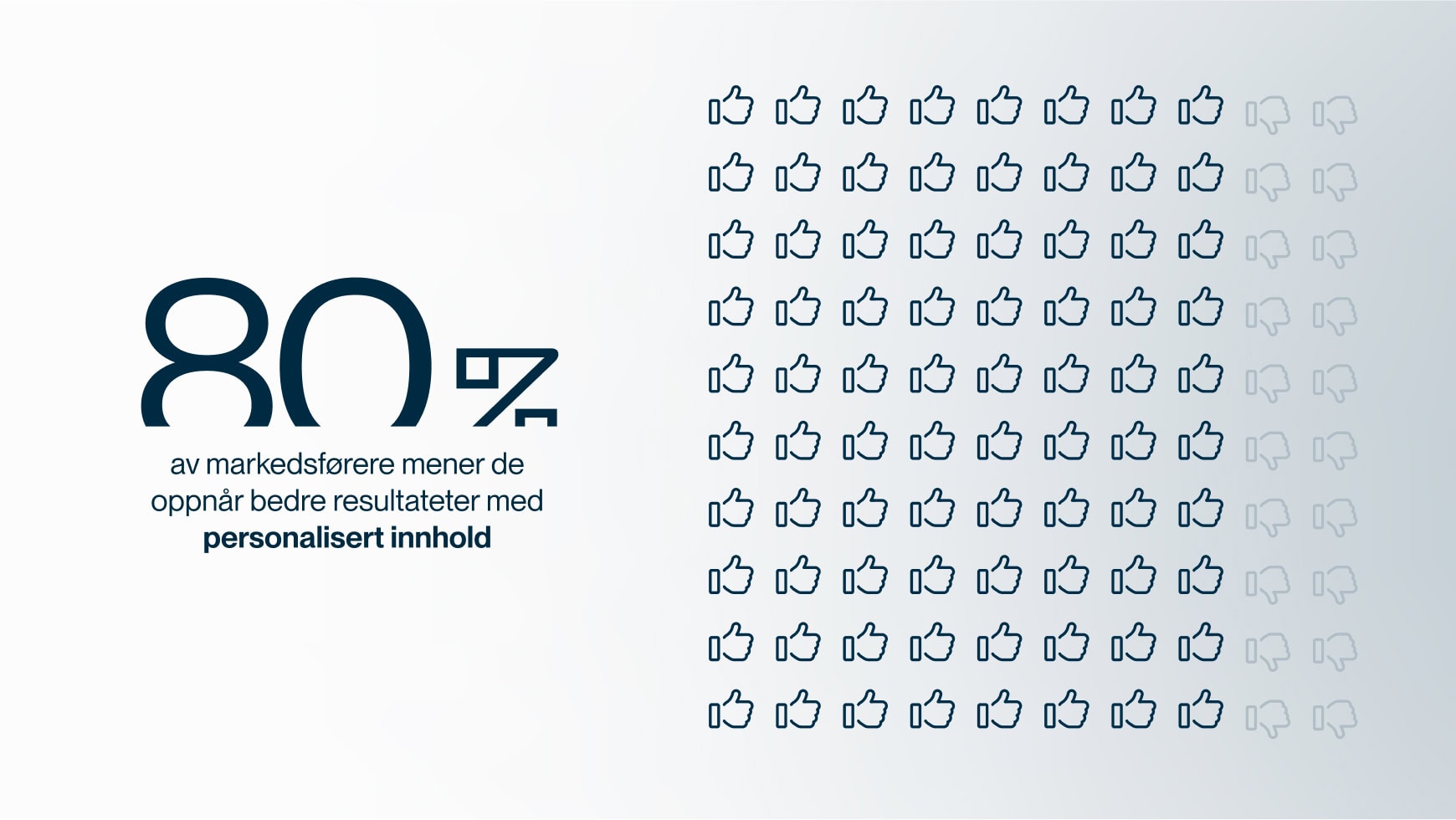
The State of Email in Lifecycle Marketing Report, litmus.com
Why personalization builds loyal customers
One key factor builds customer loyalty: relevant content. By using data from ticketing integrations, you can share content that fits each customer. For example, send exclusive pre-sales to your most loyal customers, or win-back campaigns to those who have not purchased tickets in a while.
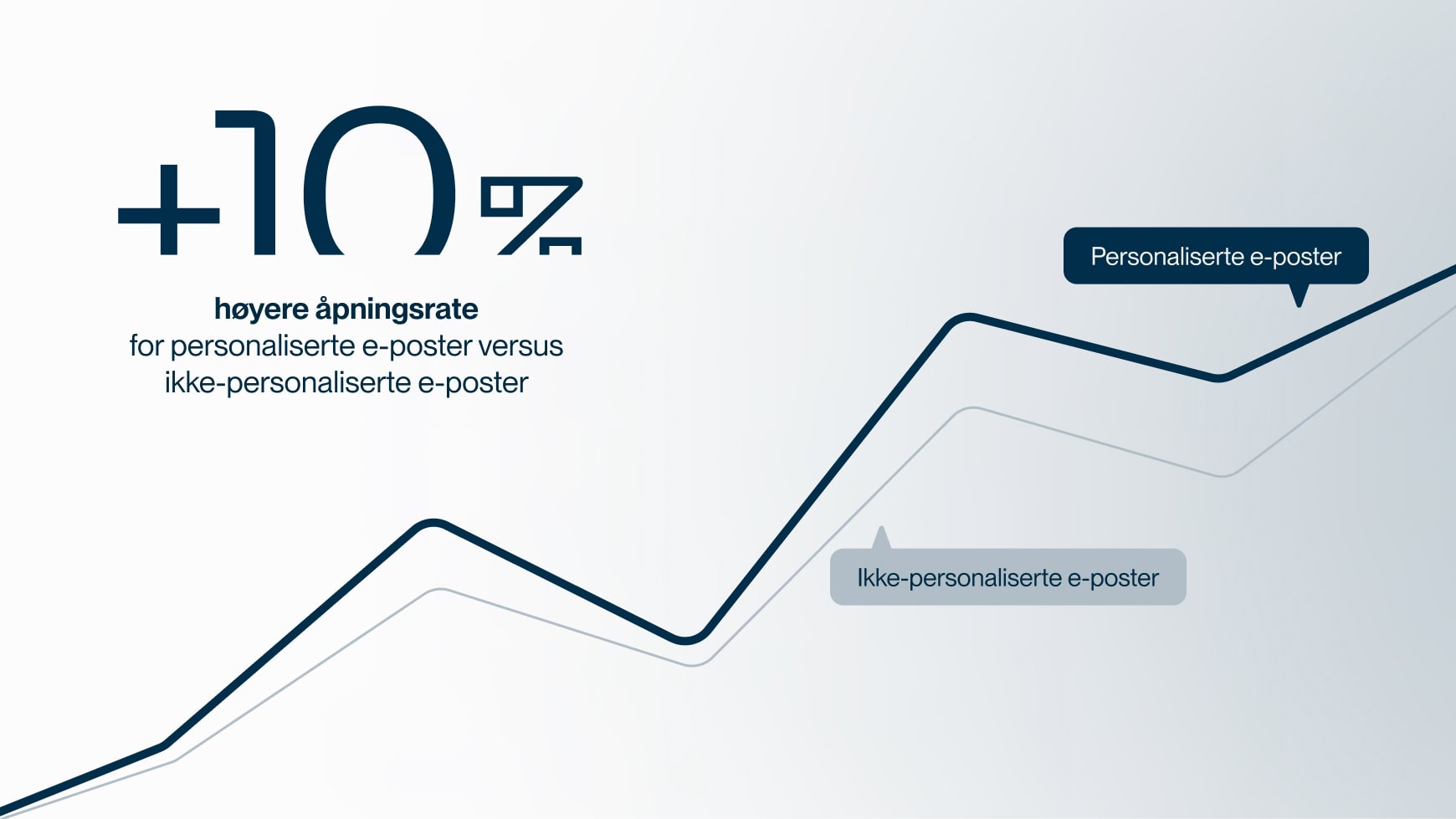
Personalized newsletters maintain interest by sharing content based on the customer's actual preferences. This not only increases open rates but also builds trust and loyalty over time.
Save time with automation
Let the system work for you. With automated reminders, you can send the right message to the right person at the right time. Send festival updates to ticket holders, concert reminders, or accommodation tips for long-distance travelers.
Automation frees up time to create better experiences for your customers, handling the details so you do not have to.
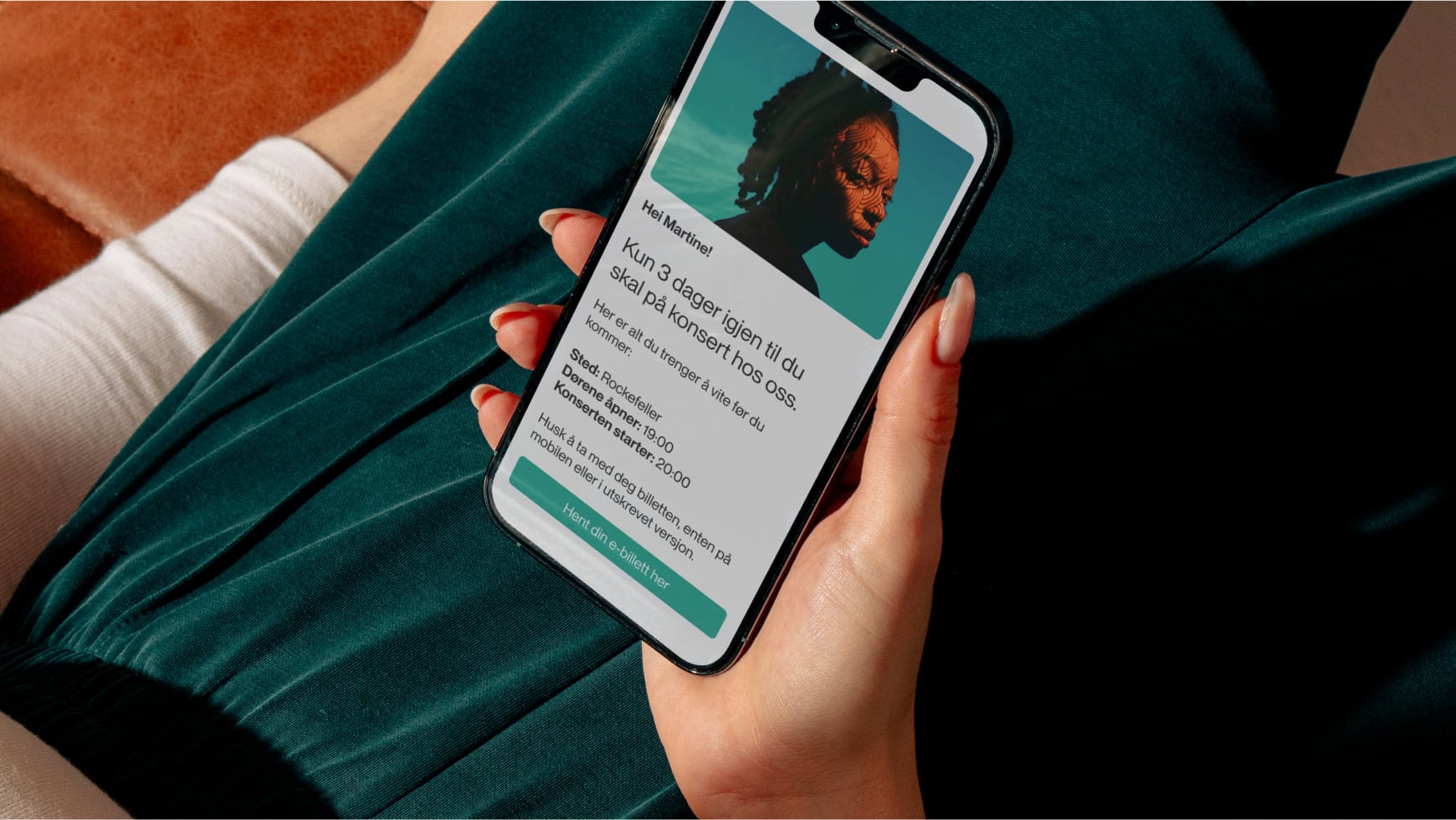
Automation frees up time to create better experiences for your customers, handling the details so you do not have to.
Measure and optimize
Integrations provide valuable insights into what works best. Identify which campaigns drive the highest conversions, which customer groups are most profitable, and how to improve your communication over time.

Use this information to fine-tune your content. Test different approaches, analyze results, and make adjustments based on actual data to continuously improve performance and deliver better experiences.
Read more

Warming up your domain and contacts
When you are starting to send newsletters or switching newsletter services, it is important to do some preparation to ensure your emails reach the recipients. One of the most important steps is warming up your domain. This increases the likelihood that your newsletters do not end up in the spam folder.
Let us go through how you can do this easily. We assume that technical aspects such as SPF, DKIM, and DMARC are in place. If not, you should first read more about email security.
Warming up the domain
Warming up the domain is about showing email providers like Microsoft, Gmail, and Online that you send emails that your recipients want. Let us say you have an email list of 30,000 contacts and want to send an offer. If you start by sending content that recipients do not like, you risk your emails being deleted or marked as spam. When many of your contacts do this, you get flagged as a poor sender, and fewer of your contacts will receive the email in their inbox. This is particularly risky when you have not yet established a good reputation.
Understanding the email provider filters
Email providers are highly sophisticated. They monitor how your recipients interact with your newsletters – whether they open them, click links, unsubscribe, delete, save them for later, or reply to them. This information is used to rate you as a sender. Do you send relevant and engaging content, or do you send content that does not engage?
Cleaning up your email list
After sending 10 to 20 newsletters, go through your email list and remove contacts who never open your emails. This is important because email providers monitor whether you send emails to inactive addresses or to people who never read them. This can negatively impact your deliverability.
Cleaning up should be done at least four times a year to maintain a healthy email list and ensure that your emails reach those who actually want them.
By following these steps, you can ensure that your domain is well-received by email providers and that your newsletters reach your recipients.
Read more

Video and animated GIFs in newsletters
Video is essential for driving engagement and achieving results. Studies show that you can achieve higher open rates, increase clicks on video links, and reduce unsubscribe rates by using video. However, very few email clients support this. So, what is the best way to use video in email campaigns?
GIFs and videos are effective ways to evoke emotions, allowing you to connect with customers in a completely different way than with just text and static images. Although video requires some extra effort, it can engage your readers to a much greater extent.
Wordstream suggests that businesses using video in their marketing can grow revenue up to 49 percent faster than those that do not. Another statistic in favour of video comes from Insivia. They found that users are 64 percent more likely to buy a product after watching a video.
In other words, using video and GIF animations in email marketing is highly effective for capturing customer interest.
How to use video in newsletters
Unfortunately, very few email clients support embedded video, as you might be used to on your website. Therefore, you need to look at other options.
A practical solution is to use a standard static image and link it to the webpage hosting the video.
In Make, you can insert videos from YouTube and Vimeo. We automatically retrieve the video thumbnail and overlay a play button. You can also upload your own image designed to look like a video and link it to the webpage where the video is hosted.
If you use YouTube, you can set the video to play automatically as soon as the reader clicks play. To do this, add ?autoplay=1 to the end of the video link.
How to use GIFs in newsletters to capture interest
Another effective technique to bring your newsletters to life is using animated GIFs. This can also benefit your marketing efforts. For instance, you can use custom GIFs to demonstrate a point rather than explaining it with heavy text. This makes it easier for the recipient to grasp the message instead of just clicking away.

What is the support for GIF animations?
Most modern email clients support animated GIFs, but certain versions, such as Outlook 2007, 2010, 2013, and Windows Phone 7, only display the first frame of the animation. You should therefore place the most important information in the first frame. A GIF is a series of images combined into an animation. Each image is called a "frame". This first frame is what displays when GIF support is missing.
There are several resources available to help you create GIFs without in-depth design knowledge, such as Make a gif and Giphy.
Although it requires some extra effort, using video and GIF animations in email marketing is an investment that can pay off through increased engagement and sales.
Good luck!
Gobi Stories is another option for adding video to newsletters to make them more dynamic.
If you want to dive deeper into using video and animated GIFs in newsletters, we recommend: https://www.litmus.com/blog/video-in-email https://www.litmus.com/blog/a-guide-to-animated-gifs-in-email
Read more

Improved Email Security: A Guide to the New Requirements from Google & Yahoo
Google and Yahoo have announced an increased focus on email security. Consequently, anyone sending more than 5,000 emails daily must authenticate, ensure easy unsubscription, and maintain a spam complaint rate below 0.3 percent.
What does this mean?
Easy unsubscription → Anyone sending newsletters and other mass mailings must provide Gmail users with a one-click option to unsubscribe from commercial emails. Senders must also ensure that unsubscribes take effect within two days.
Note: As a Make customer, you do not need to worry about this because it is built into Make and has been operational for several years.
Reducing spam → To ensure Gmail users receive fewer unwanted emails, Google is setting a clear spam rate limit that senders must respect. The goal is cleaner inboxes free of spam, and the limit is set at 0.3 percent spam complaints. That means only 3 spam complaints per 1,000 emails sent.
Make also helps you here. Anyone who unsubscribes is automatically removed from your email lists. People who click the spam button in Gmail are also automatically unsubscribed. However, it is important that you send relevant campaigns and newsletters.
Email authentication → When sending mass emails, senders must authenticate their emails. This is done using three standards: SPF, DKIM, and DMARC.
If you are, or wish to become, a customer of Make, this is something we go through in an onboarding meeting. The vast majority of our customers already have SPF and DKIM set up. The next step is to add DMARC.
What is DMARC?
Domain-based Message Authentication, Reporting & Conformance (DMARC) is a technical standard and protocol for email authentication developed to improve email security and protect against email spoofing and phishing attacks.
Imagine we deliver food to customers where mustard (SPF) and ketchup (DKIM) must always be included with the meal. If we forget to include the mustard or ketchup, DMARC specifies what we recommend the customer does with the food. We can encourage the customer to eat the food as usual (p=none), throw the food in the bin (p=quarantine), or refuse to accept the food (p=reject).
Translating this to email, DMARC allows you to tell the recipient's server what should happen to the email if SPF or DKIM fails.
DMARC Host/Name: _dmarc.domain.no
Type: TXT
Value: v=DMARC1; p=none;DMARC works alongside SPF and DKIM – two fundamental methods for email authentication.
Read a detailed explanation of SPF and DKIM
Read about warming up your domain and contactsWhy DMARC is important
DMARC is an effective tool that ensures the emails you send are perceived as secure. DMARC acts as a seal of trust and credibility. From our perspective, this is a very positive change.
Read more

Save time and avoid duplicate work with integrations
Integrations connect Make with your other business systems. This simplifies customer communication, saves time, and prevents double work or inefficient processes. Once in place, the integration ensures a seamless data flow that unlocks numerous possibilities. Here are a few examples.
Most businesses use some form of CRM system. This could be your accounting software, such as Fiken, Tripletex, 24SevenOffice, or Visma, or a dedicated CRM system like Superoffice, Microsoft Dynamics, Salesforce, or Pipedrive. Alternatively, you might run an e-commerce or subscription-based business using Shopify, Mystore, Viskan, or WooCommerce.
All of these platforms serve as your master system, where you maintain your contact data. With an integration to your master system, you open up significant opportunities for targeted communication.
Time is money
The primary benefit is time saved. Instead of manually entering the same data across multiple platforms, the integration automates the process. You no longer need to export lists from your master system and import them into Make whenever you get new contacts. Unsubscribes are also handled automatically, keeping the data in your master system and Make consistent at all times.
Once synchronization and data flow are established between your systems, you can leverage the core benefit of the integration: automation.
Email automation is an effective way for your business to engage customers, improve the customer experience, and increase conversion rates.
The benefits of email automation
One of the main advantages of email automation is sending targeted messages based on customer behavior. For example, if you sell newspaper subscriptions, dietary supplements, gym memberships, or software services, the integration allows Make to register when a customer purchases or cancels a product. This purchase or cancellation date can then be used to trigger automated emails.
Make monitors these dates. If a new contact is registered with a purchase date matching the current date, we trigger a welcome sequence:
These are just a few examples of how you can automate communication using an integration. The main benefit is efficiency: you set up the process once, and it runs automatically until you decide to stop the campaign.
Read more

Newsletter solution for public institutions
Make offers solutions for sending newsletters and SMS, tailored for public sector entities. We understand that strict requirements apply – to design, privacy, and data storage alike. That is why we assist you every step of the way, from training to daily support.
As a Norwegian company, we comply with Norwegian regulations and process and store all personal data in Norway. This ensures peace of mind, as Norway provides a highly stable security and geopolitical environment for predictable operations. We also make it straightforward to retrieve necessary documentation for freedom of information requests and ensure full compliance with GDPR requirements.
Universal design
Public sector organisations must communicate with the entire population. This means that people with various needs and capabilities must be able to read the content presented.
The goal of universal design is to ensure solutions can be used by everyone, eliminating the need for specialized alternatives. To achieve this, all newsletters, websites, and ICT solutions must comply with the WCAG 2.0 standard – a framework designed to ensure that all solutions are built so that everyone, including blind and visually impaired users, can access them.
Make ensures that all requirements for the universal design of newsletters are met and that the WCAG standard is followed. This allows you to focus on creating quality content for your newsletter rather than worrying about compliance guidelines.
GDPR and data privacy
Many major newsletter providers are based in the US and are subject to increasingly invasive US legislation. European regulations state that US authorities have excessive access to personal data, which is not permitted. European companies transferring personal data to the US – which is the case when using a US newsletter provider – must therefore implement protective measures to avoid violating the law. However, these measures are not clearly defined, leading to significant uncertainty.
We make GDPR compliance simple, as we store all personal data in Norway. Local storage increases both security and speed, enhancing the overall user experience.
US providers may be non-compliant
We help when you need us
For a public sector entity with major responsibilities, acting correctly at all times is essential. This means resolving errors and issues as soon as they arise. No one has time to wait for support that does not respond.
Make offers free support in Norwegian and assists when you need it, not just when it suits us.
SMS distribution ensures efficient communication
SMS is an excellent communication channel for sending short and concise messages. In fact, few other channels can match the open rates and engagement of SMS. On average, 95 per cent of recipients read the message within five minutes.
During national crises, threat situations, or other events where life and health may be at risk, public authorities and national bodies are responsible for informing the public. Information must be distributed rapidly, and it is vital that it reaches as many people as possible. This requires a secure and stable SMS delivery solution, free from delays, delivery failures, or other issues.
Our SMS solution is designed for both simple and complex needs, and can be used for both mass distribution and one-to-one communication.
Chosen by major public organisations
Our intuitive user interface is the main reason clients choose us. We focus on prompt support and deliver via Norwegian servers and IP addresses, ensuring that your newsletters reach as many recipients as possible.
Make is one of the leading newsletter providers in Norway. We are trusted by several public sector entities, such as the Norwegian Directorate for Digitalisation, the Norwegian Directorate for Education and Training, and Oslo University Hospital.
Read more

Newsletters offer the best return on investment
Newsletters are highly effective and cost-efficient marketing. Get the most out of your newsletter campaigns with our expert advice.
Email marketing remains one of the most powerful digital marketing tools. According to Litmus, newsletters are unmatched when it comes to ROI (return on investment). We are talking up to 36 times the effort. If you spend one krone on email marketing, you can expect 36 kroner in return.
The stability of email contributes to its strong performance
Newsletters have a clear advantage compared to social media: They are not governed by algorithms. Meta continuously introduces new algorithms that affect visibility and social media, and marketing trends are in constant flux, while email has stood firm as a rock since the beginning of the internet. You are the sole owner of your email lists.
The requirements for consent in marketing legislation also mean there is a closer alignment in email marketing between the recipients' interests and the topics presented to them, compared to social media. With good email marketing, you are well-positioned to build a strong bond of trust between sender and recipient.
5 reasons why email marketing is more effective than social media
Newsletters are low cost and high utility. It is easy to measure the effect of your mailings – how many open them, how long they read, who clicks the links, and how many bounce. Newsletters help keep your company visible and top-of-mind with customers, and they help drive additional sales.
Newsletters in different formats – which ones fit best?
There are different types of newsletters. The best fit depends on your type of business and what you want to communicate. And perhaps more importantly: What your customers care about.
To send good and relevant newsletters you need to know your customers. Here are some of the most common newsletter formats:
Campaigns or offers
If you have campaigns or offers on products or services, this is highly relevant to your recipients. This is perhaps the most common newsletter format and the one proven to deliver the highest ROI of all marketing initiatives.
New products and services
If you have something new and exciting to offer, tell your customers about it. Those who have bought from you before or shown sufficient interest to be open to a purchase are a great fit for this type of newsletter. How else will they find out what is available?
Surveys
Surveys in newsletters work well for two reasons: They help you get feedback and they let the customer express themselves. We like to feel involved, and you can often get participants to voluntarily share information or contact details you can use to make more targeted offers. Win-win. But remember to ask for consent to use this information.
Company news and updates
This is primarily about the company and the people who work there. Have you secured new customers? Partners? What are the employees doing, and who are they? These newsletters help build a community between you and your contacts, giving the company a human face. It is also an excellent way to communicate company values and your direction.
Curated articles and resources
By signing up for your newsletter, contacts can receive weekly updates on articles and other resources you have published. You can also build unique emails featuring highlights from the week or month. If your company has a blog, this is a great way to share updates.
Write about your company's field of expertise. A good example of this kind of email is Helt Digitalt, which summarises the week every Friday morning with updates on social media, among other things.
When are the best sales days of the year?
What should the newsletter contain?
Do you find it difficult to create newsletters that both engage and convert? Don't worry. Here are our best tips to get you started:
1. Clear objectives for the newsletter
What do you want to achieve with the newsletter? What action do you want the reader to take after reading it? Answering this makes it much easier to decide on both the content and the conversion points you need. A conversion point is, for example, a call-to-action button or link.
Increase sales
Build awareness of a new product, service, or brand
Increase traffic to a specific landing page
Create engagement in other channels with a Facebook competition or similar
Other types of conversions, such as downloading a report or registering for a webinar
2. The subject line is the newsletter's superpower
This is without doubt the most important part of all. If the title does not grab attention, no one will open the email. Keep it short and catchy so it can be read in full on mobile. Often 30 to 50 characters is ideal. Use a call to action or a question. Avoid looking spammy by skipping exclamation marks, discount percentages, or capital letters. Emojis work well, but consider your audience.
Personalisation: Show that you know your customers. Use their name, location, wish them a happy birthday, or tap into interests and preferences you have gathered from previous interactions.
Relevance: Connect with current trends and events, such as seasons. Your customers are likely also focused on national holidays, Christmas, or summer holiday preparations.
Storytelling: Learn from online news sites and how they convey the essence of a story in just a few words. Sense of urgency: Create the impression that an item or offer is only available for a limited time or might sell out quickly.
Offers and discounts: Most of us like to make a good purchase. This in itself is a strong sales-triggering message, as long as you do not overdo it.
3. Engage in a few words
There are many different theories on how long the text in the subject line needs to be to achieve the best conversion rate.
ReturnPath is one of several companies that have tested this in recent years without being able to prove a correlation between the number of characters and the actual open rate. What we do know for sure, however, is that more and more people check their email on mobile. Just think of your own usage habits!
Therefore, it is crucial to design your newsletters with smaller screens in mind. We recommend keeping subject line text to a maximum of 50 characters to ensure the message gets through.
4. Create high-converting content
The hallmark of a good newsletter is that it feels relevant to the recipient. The theme should ideally stem from the customer's life, needs, and challenges, aiming to solve these in the best possible way through the products or services your company offers.
You know best what your customers care about. Are there, for example, questions that customer service answers repeatedly? Articles with concrete tips and advice are a great starting point. Newsletters featuring "How to..." angles also tend to have high open rates.
In addition, it is important to choose themes that align with your profile and what you actually want to sell. If you run an online furniture store, it is natural to write about interior design and decor trends, but perhaps not about the weather or politics.
5. Newsletters can be both long and short
Your message and objective determine how long your newsletter should be.
If you want to share discount codes or showcase new products and services, you should in most cases keep the text short and to the point.
If, on the other hand, you want to build your brand and relationship with your customers, you can afford to use more and longer text. Combine different content to show the breadth of your company profile.
Keep to three to five different elements in the newsletter, depending on what you want to communicate. Too many products or a long list of articles makes the layout cluttered and less tempting to click on.
6. Design and interactive elements
If you want more than just text, images, and links, you can add interactive elements to the email. This can be anything from GIFs to menus, slideshows, and shopping carts. Done right, your newsletter can become an engaging mix of features that make it attractive and fun to interact with – like a mini-website in itself. The challenge is that these newsletters might not work in all email clients or can appear cluttered.
Speaking of cluttered – ensure a clean design when creating your newsletter. Give elements room to breathe and use headings and images strategically. Make the most important parts largest or most prominent so the eye easily understands where to focus. Use fonts optimised for newsletters – email clients only support a few select fonts (click here to see which ones).
Think about what your company wants to communicate and find an expression that supports it. If you are serious and high-end, a black-and-white aesthetic with elegant images can work well. If you are more playful, you can add a GIF and bright colours. To create a clear identity, it is a good idea to use the same colour palette and fonts as you do on your website and other official materials. You want to maintain the company profile in your emails too, ensuring recognition and reinforcing your brand identity.
7. Call-to-action (CTA)
Do not forget that every newsletter has a goal. Always include a CTA, meaning a button or link prompting the recipient to take the next step. This could be answering a quiz, downloading free content, or buying something in the online store, to name a few options. Think about what you want to achieve with the newsletter: sales, sign-ups, gathering information, or nurturing the customer relationship?
The CTA button should be the most enticing part of the email, so ensure it looks good. It is usually wise to link it to a dedicated landing page focused solely on the action you want the reader to take, increasing the likelihood that they will follow through.
8. Optimise your newsletter
One of the most important success criteria for email marketing is that you continuously optimise your newsletters based on what works for your specific customer group.
With an A/B test, you can easily compare different versions of your newsletter. If you have a large email list, you can run an A/B test on a small sample first, then confidently send the best-performing version to the rest of your list.
It is easy to get carried away with A/B testing, but avoid the temptation to test everything at once. Best practice is to test one element at a time, such as two different versions of a subject line or an image. That way, you know exactly what caused the difference in results.
While it is always disappointing to see customers leave, you should not make it unnecessarily difficult to unsubscribe from your newsletter. The main rule is that unsubscribing should be just as easy as signing up. You can ask for the reason for unsubscribing, but do not make this feedback mandatory – you risk only annoying your users.
Segmentation – different content for different audiences
Instead of sending the same generic email to everyone on your contact list, you should use segmentation. This means dividing your list into different target groups, so only relevant content is sent to them. This saves you from sending irrelevant information and increases open rates by making the content more relevant to the reader.
Segmentation – from beginner to professional
You can segment based on anything you know about the subscriber – from industry, location, interests, website behaviour, gender, or age. Dividing your readers into groups based on interests or demographic variables can do a lot for your marketing. This allows you to tailor what you send to, for example: [female, 30, marketing manager] and [male, 50, CEO].
Newsletters and privacy
To send out newsletters, you need to build quality email lists, and contacts must provide their information voluntarily. The General Data Protection Regulation (GDPR) makes it illegal to store information that is not given with explicit consent, and this includes email addresses.
You should therefore make it appealing for your readers to opt-in to receive information, which can be done in several ways. A common strategy is to have a sign-up form or popup on the website, especially if you have a blog they can subscribe to. Otherwise, you can offer incentives with discounts, free (and valuable) content, a Christmas calendar, or a quiz where results are sent via email. If readers feel they get value in return for their email, they are naturally more willing to share it. Ideally, the newsletter itself should also be of interest.
Make puts privacy first and stores all personal data in Norway
When should you send the newsletter?
Almost as important as the content is finding out when and how often to send it. You want recipients to get the newsletter at times when they are receptive to opening and reading it, but when is that? You also need to find a balance in how often emails are sent. Send newsletters too rarely, and customers will forget you. Send them too frequently, and they will perceive it as spam.
When should you send newsletters to achieve maximum effect?
When it comes to promotional emails, over 85 per cent of respondents want to receive them at least monthly, while just over 60 per cent want them at least weekly. You can use this as a starting point when planning your send frequency, but remember that the more tailored the content is to the target group's interests, the more receptive they will be. Waiting a week or 14 days between sends allows you to gather more valuable information into a single email, increasing its overall worth.
It is difficult to give a definitive answer on the best time to send. The best approach is to test different times and see what your customers respond to best.
However, we do know a few things. Generally, Wednesday is the best day, followed by Tuesday and Friday. Saturday and Sunday consistently score lowest on open rates, but convert better once the email is actually opened. Remember that this data is heavily influenced by the type of product or service you sell. B2B products often see better results on weekdays when people are in work mode and more receptive to that type of content. B2C, especially leisure-related, will likely perform better during weekends.
Open rates will also vary based on external factors. Fewer people will open your newsletter on a sunny summer day than on a rainy Wednesday in November. So while statistics are a good indicator, do not rely on them too heavily.
Common issues when sending newsletters
As with most technical solutions, you may encounter certain issues with your mailings. What are the most common challenges?
The newsletter is bounced
If your newsletter "bounces," it means it was returned for various reasons. A soft bounce means it reached the email server but was returned because the inbox was full, the server was down, or the email was too large. A hard bounce means the email address does not exist, and you should remove it from your database. A remote bounce means the recipient's server accepted the email but returned it, for example due to a spam filter.
What is a bounce, and what is the difference between a hard bounce and a soft bounce?
Out-of-office autoreply
Automated replies, or autoresponders, are related to bounces as both send an email back to you. In this case, however, your email did reach its destination, but the recipient has set their client to reply automatically, for example to say they are on holiday or using a new email address. Although it can be some work, it is important to read these so you can update your database or hold off on the next email until the subscriber is back at work.
The newsletter ended up in the spam filter
The last thing you want is to end up in the spam folder, and the easiest way to avoid this is not to spam. Yet it happens too often that legitimate marketers end up there because they have not followed correct protocols. In the worst-case scenario, your IP address and domain can be automatically associated with spam and blacklisted entirely.
Some common tips to avoid this include using descriptive, honest subject lines, including a working unsubscribe link, and removing inactive users. If a large portion of your user base never opens your emails, internet service providers will take notice and are more likely to flag your newsletters as spam.
There are also security protocols – SPF, DKIM, and DMARC – that help verify that you are indeed the sender you claim to be. This builds trust with the recipient's email server, minimising the risk of your newsletter ending up in spam.
The newsletter is marked as spam
Sometimes recipients will click the spam button when they receive an email from you. Many who use free services, like Gmail, use this feature to unsubscribe. If this happens, you should first try to determine why the email was perceived as spam, especially if multiple recipients react this way. Secondly, you should remove these contacts from your list immediately. This keeps your lists clean, consisting of people who are genuinely interested, and helps you avoid ending up on ISP blacklists.
Why is your newsletter flagged as spam?
Relevant content is key
The better you match the recipient's interests and consumption habits, the more interested they will be in receiving your newsletters – and the better the results. Segmentation, personalised messages, and automation will help you get there.
Read more

Norwegian SMS service for businesses and organizations
SMS can be an outstanding communication channel for short and concise messages. Make offers a flexible Norwegian SMS service for businesses and organizations that want to send messages quickly, target-oriented, and securely – regardless of size or industry.
For Norwegian businesses and organizations, choosing an SMS provider is not just about the price per message. The solution should also provide control over consent, opt-outs, segmentation, statistics, keywords, and costs.
How often do you leave an SMS unopened? Very rarely, right? That is precisely what makes SMS a highly effective form of communication. In fact, few other communication channels can boast better open rates and engagement than SMS. On average, 95 percent of recipients read the message within five minutes.
Flexible SMS solution suitable for various purposes
SMS is an effective two-way communication channel that allows the use of keywords and receipt messages. This makes the process simple and clear, letting you use it for everything from notifications and alerts to customers and members, to large-scale voting or competitions.
Our SMS solution is designed for both simple and advanced needs, and can be used for both mass broadcasting and one-to-one communication. SMS can be part of a larger campaign and used to support newsletters, for example, but also works excellently on its own. A mix can be highly effective; combining newsletters and SMS allows you to reach out with both long and short messages.
SMS service for different areas of use
There are many suitable use cases for an SMS service. The most obvious is sending information to customers and members quickly and efficiently. It simply does not get any easier: write a text and send! The vast majority read the message as soon as they receive it. This is good news for response handling and brand reputation.
You probably know how convenient it is to receive an SMS reminder about next week's dentist appointment or the event you signed up for two months ago. Sending automatic reminders via SMS can ensure that customers show up on time and appointments are not forgotten. With automation in Make, you can set up automated workflows to reach the right contacts at the right time.
It is also possible to avoid hassle with different passwords, forgotten passwords, and failed logins. SMS can function as a login method, replacing the often-forgotten password. With SMS instead of a password, you enter your phone number, receive a unique code, and log in.
SMS is also well-suited for various voting processes with its keywords and receipt messages. But as always – remember to choose your communication channel based on purpose, content, and target audience.
Features you should expect from a good SMS provider
A good SMS provider should offer more than just sending text messages. Our SMS service has a range of features that make it user-friendly and flexible. For example, reserved keywords allow you to receive incoming messages and opt-outs. This way, recipients can order products or appointments, or participate in competitions, by including the keyword in their order or reply.
By using merge tags, you can easily personalize your messages. These merge tags automatically replace predefined fields in an SMS with the recipient's personal details, such as name, appointment time, or the ordered item. This instantly makes the message feel more relevant.
In Make, you can segment and divide your contacts into subgroups based on the information you have about each contact. This allows you to send targeted SMS based on demographics, geography, or behavior, making the message appear far more relevant to the recipient than if it had been part of a general mass broadcast.
Statistics in Make give you a complete overview of who has received your text messages at any given time. There is also a dedicated visualization feature that allows you to preview how the message will appear on the recipient's mobile screen.
Send tens of thousands of SMS – with full cost control
If you want to send short and concise messages, SMS can be a smart channel choice. Voting, notifications, and verifications require fast delivery and often quick response handling. With our solution, you can send and receive tens of thousands of messages within a few minutes.
Avoid unforeseen costs caused by a text message unintentionally becoming much more expensive than originally planned. Using emojis, for example, can quickly double or triple the price per SMS. Make gives you an overview of the message length, so you have full control over costs.
In addition, you have full control over costs. We have a built-in SMS character counter that gives you precise control over the number of characters used and their price. This keeps you updated on the length of the message and avoids unnecessary costs. For instance, using emojis can quickly double or triple the price per text message. And if you write too much and have to split the text over two messages, you have suddenly doubled your costs. It is therefore useful to have a feature that alerts you to expenses per broadcast and reminds you that when it comes to SMS, brevity is key.
Our SMS solution makes communication fast, efficient, and simple. In combination with newsletters, the effect can be outstanding.
How to market smarter with SMS
When it comes to marketing, SMS is email's underrated supporter. It can hardly run an entire campaign on its own, but it has unique use cases that fit perfectly with newsletters, for example.
SMS is read by almost everyone
The advantage SMS has over email and other channels is that almost no one will leave an SMS unread. It often takes as little as 5 to 10 minutes from when the SMS is sent to when it is read, and many will also click through the attached links. If you have something to communicate to your customers, there is hardly a better way to do it than via SMS.
When should you send SMS?
The challenge with SMS is that the inbox feels like a more private space than email. Few will mind receiving an SMS once in a while, but if you send them too frequently, they will quickly be perceived as spam. If it is about notifications, such as from an airline informing you of delays, people will be grateful for hourly updates. For unsolicited SMS, between one and four a month is a better target.
Also, never send SMS later than 18:00. Most people do not want to be disturbed late in the evening, and it will take some time to send out all the messages, meaning they could arrive even later than the time you click "send".
Keep it short
When you send SMS, every letter is premium, and 160 characters is the maximum. You can, of course, split the message over multiple sends, but this quickly becomes expensive. If you use emojis (recommended!), the length also drops to 140 characters. If you want to include a link, you should therefore use URL shorteners like tinyurl or bit.ly.
People appreciate being able to scan an SMS quickly anyway, so there is little to gain by sending them an entire novel.
GDPR also applies to SMS
Just like with your email lists, you must comply with GDPR for SMS. This means that contacts who have not consented specifically to being contacted via SMS for offers or alerts should not receive any text messages.
It must also be easy to opt out, typically by using a keyword. You are required to include opt-out information or a link at the bottom of the first SMS, but we recommend including it every time. If the recipient does not want your SMS, you have nothing to gain by making it difficult for them to opt out.
Follow up on the newsletter via SMS
Since sending SMS to everyone on your list can be costly, it is often smart to send an email first, and then give a second chance to receive relevant information via SMS if the email is not opened. This also allows you to direct them to your newsletter for further information, avoiding the need to include all details in the SMS.
Alternatively, you can contact those who read the email but did not click through. SMS then becomes a tool to give an extra little push in the right direction to those who show interest. You decide where the need is greatest and how to best utilize your SMS budget.
A great match for simple two-way communication
By adding SMS keywords to boards, advertisements, or newsletters, you make it easy for potential customers to communicate with you. For uncomplicated (and highly automated) two-way communication, this is perfect. Often, we are talking about competitions where you can quickly confirm receipt of entry via SMS. Then, you contact the lucky winners again via the same phone number. Such incentives make it appealing for many to share their contact information and, at the same time, consent to receive other relevant information or offers.
8 requirements you should demand from a Norwegian SMS provider
There are great advantages to being able to send SMS to existing and potential customers, subscribers, and users. However, choosing the right SMS provider can be difficult. That is why we have gathered our best advice and created a list of requirements you can use when evaluating a Norwegian SMS service.
Most points require you to have a dedicated SMS service. This is perhaps obvious, as you are unlikely to send SMS manually from your private phone, but keep in mind that the SMS service you choose must be able to handle all the scenarios mentioned below.
"Registration for our events skyrockets right after the SMS is sent!" – Christian Mjelde, Huseiernes Landsforbund
If you are unsure which SMS service is right for your business, you can test Make for free. Click the Try for free button and register, and a sales representative will contact you for a walkthrough.
Read more
RSS: The asset that can boost sales and reputation
RSS (Rich Site Summary) makes it easy to deliver fresh and updated dynamic content to contacts across various platforms. Here is how.
An RSS feed retrieves content from different sources automatically. This means it does the work for you when you need to feed content into your newsletter. Blog posts, news, podcast episodes, products – the RSS feed automatically pulls this from your website and ensures the content you want to communicate is up to date. In short, RSS simplifies your workday in many ways.
RSS is also highly useful for contacts who prefer to have new and fresh information delivered straight to their inbox rather than having to search for it themselves.
RSS makes it easy to convert content
RSS is a standardized format based on XML. This means RSS feeds consist of XML code. This script contains all essential information about, for example, a blog post. This makes it straightforward to convert the content on your website into elements you can use in your newsletter.
Where you previously had to manually copy text and images from a website to a newsletter, you can now let the RSS function handle that task so you can focus on other priorities.
RSS - a useful and sophisticated tool
RSS is often an overlooked asset that many believe belongs to the past. That assumption is incorrect. Not only is RSS a useful tool for retaining contacts, distributing news, and minimizing workload, it is also sophisticated. It offers many opportunities to make content relevant to each recipient – which is essential for successful marketing in today's landscape of conscious consumers.
Once you have set up an RSS feed on your website, you can use RSS to serve dynamic content through automated processes. This means you can both tailor and fine-tune the content, while RSS does the heavy lifting and frees up valuable time. This personalized content allows you to, for example, promote an event in Bergen to residents of Bergen, while residents of Oslo find out what is happening in their city.
You can also target the content and adapt it to different recipients through segmentation, which is an important part of effective marketing. In addition, you can determine the frequency of updates yourself so that your contacts are not overwhelmed with information.
A short RSS guide
To use RSS, you need an RSS feed on your website. If you produce high-quality content and invest resources and time into a solid content strategy, you should definitely implement an RSS feed. This offers an excellent opportunity to build strong relationships with your contacts far more efficiently, and cost-effectively, than through social media advertising and campaigns.
Most publishing platforms have a built-in feature for feeding content, and many webshops also have a feed for each product category.
Once you have set up an RSS feed, you can simply replicate the setup wherever you need it.
Fully automated mailings with an RSS template
Once you have set up a functioning RSS feed on your website, Make can use this to generate the entire newsletter and send it at a scheduled time. For example, if you send out monthly newsletters, an RSS template will allow you to automate this entire process.
What if you do not have enough content on your website at the scheduled sending time? Make detects this and will delay sending the newsletter until you have sufficient content on your website.
Let Make work for you, not the other way around. All you need to do is set up the template, determine how much content should be included in the mailings, and set a scheduled time for the newsletters to be sent.
Read more

Dynamic content strengthens your marketing
Say goodbye to marketing without the recipient in mind. Dynamic content allows you to create personalized messages tailored to each individual recipient.
Modern email marketing offers a wealth of opportunities. One of these is dynamic content. Dynamic content is simply content handpicked for the recipient.
The dynamic content feature allows you to add specific sections of targeted content to a newsletter. The different recipients of the newsletter then see content that is relevant to them based on criteria you have selected. This means you can offer umbrellas to people in Bergen and sunscreen to vacationers in southern Norway in one and the same email.
Dynamic content that reaches interested recipients
With dynamic content, you can make email marketing personal because you can insert targeted content that only selected recipients receive. Text, images, and layout can all be adapted to each recipient since you decide who sees the different sections.
If you sell sports equipment, you reach recipients who are actually interested in sports equipment, not those looking for technological innovations or strollers. If you want to communicate only with those living in the Oslo area, you do just that. Specific, easy-to-use features let you define who sees what.
Dynamic content is the targeting of content within emails. It is a setting in Make available at the row level, where you define which contacts the row should be displayed to.
Everyone is different. Instead of thinking that this complicates or limits your marketing, look at the opportunities it provides. It means you can target your content with high accuracy to reach the exact people you are looking for.
Example: Concert
Let us say we are sending out a newsletter where part of the content mentions concerts taking place in Oslo, Bergen, Trondheim, and Tromsø. We assume that we have a contact database covering all of Norway and that we have access to the postal codes of these contacts.
Make's solution for dynamic content allows you to let those interested in Oslo see content that is only relevant to them without others seeing it. In other words, you can handpick who sees specific parts of your newsletter, delivering personalized content to everyone. Simple and effective.
You can segment directly in the newsletter. Instead of creating four segments and sending each of them a newsletter, you can create one newsletter, segment the content, and send it once.
The benefits of dynamic content
This approach delivers many benefits. Recipients who feel the content is relevant to them are more motivated to engage. The likelihood of sales increases, and so does revenue. In addition, personalized content improves the customer experience. Your customers get the content they want.
Because remember: Your customers are demanding. You can no longer rely on a one-size-fits-all approach. That is not enough in today's market with conscious customers who expect relevant content.
Dynamic content is a time-saving way to get your message out. Instead of sending out many variations of the same newsletter to different target groups, dynamic content allows you to gather all variations into a single email.
If you combine dynamic content with automated sending, it becomes an extra powerful tool. Make offers both. Read more about email marketing automation
Read more

What is email automation?
Email automation is one of the most powerful and effective tools in email marketing. Once you set up the system the first and only time required, it runs completely on autopilot. This is why you can practically send emails triggered by specific events or times without lifting a finger. Although it might seem technical, getting started is actually very simple.
Integrations connect Make with other data systems you use. This makes communicating with your customers easy and time-saving, helping you avoid duplicate work or inefficient processes.
What does email automation involve?
Automation is when emails are sent automatically without the sender needing to do anything. The emails are programmed to go out when specific conditions, known as triggers, are met. This can be an action taken by someone on your contact list (behavioral trigger) or an email sent at specific times or dates (time-sensitive trigger). Such automations make it possible to send emails to the right audience at the right time.
For example, you can set up a trigger that automatically sends a welcome email when a new subscriber joins your newsletter list. This saves you from having to do this manually every time a new contact signs up.
Why email automation can transform your business
Email automation can work wonders for most businesses, regardless of size or industry. Here are some of the reasons:
You can create more personalized emails: automation gives you the flexibility to customize.
The ROI for automated emails is exceptionally high: recipients receive your message at exactly the right time.
Automated emails are opened more frequently: according to Epsilon, trigger-based emails have a 199% higher click rate.
Email automation is a prime opportunity for your business to engage customers, improve the customer experience, and increase conversion rates.
9 ways to leverage the automation feature
Email automation offers a wealth of opportunities. Here are 9 concrete steps you can implement today.
More ideas to explore
There are dozens of automation solutions you can implement. Here is a brief list of additional ideas to consider.
Request customer feedback
Email surveys are an excellent way to understand how customers view your services. You can use automation to trigger a survey email after a specific action, such as a purchase or registration.
Birthdays and special occasions
Acknowledge milestones and special events. Surprise your customers by sending a congratulatory email on their birthday, or provide an offer on the anniversary of them becoming a client.
Transactional updates
Automate confirmation or thank-you emails so they are dispatched immediately when someone purchases a product or completes an action that requires confirmation.
Deliver high-value content
Once a new contact is familiar with your business, you can introduce email sequences that provide deeper insights. For example, you can send a blog series on a specific topic to deliver value and strengthen the relationship.
Introduce services with an onboarding email
Similar to welcome emails, these messages give recipients a quick overview of what to expect after subscribing. If someone signs up for a digital service, send them an email explaining how the platform works and the frequency of updates.
Events
When someone registers for an event, add them to a segment and send automated reminder sequences. You can also send a follow-up thank-you email after the event.
Track customer progress
Monitor how customers interact with your product and send them weekly updates on their progress, such as completed steps or achievements.
Read more

Build high-quality email lists for newsletters
Newsletters are an excellent way to reach the right audience. But do you know how to effectively build the best email lists for your newsletters?
Anyone working in marketing and sales knows the value of high-quality email lists when sharing news. However, gathering contacts for such a list takes time, and getting recipients to open the newsletter and actually take action is even more challenging.
Without contacts, your newsletter is nothing. It is the contacts, the recipients, who give the newsletter value – they are its lifeblood. Therefore, they must be well nurtured. Building and maintaining quality email lists is an ongoing task, but the return on investment can be invaluable for your business.
If you think email belongs to the past and you are focusing solely on your website and social media, you might be missing out on a powerful way to engage directly with potential customers.
Embrace GDPR rather than fighting it
You do not build a perfect email list overnight. The GDPR regulation has made gathering contacts more challenging since everyone must actively consent. Unless your customers have agreed to receive emails, you cannot contact them. The benefit is that those who do consent are genuinely interested in what you have to say. Seize this opportunity; it simply requires a bit more strategy and finesse.
Remember that it is better to have a shorter list of engaged recipients than a long list of people who do not even open your emails. Long, poorly maintained email lists can also result in high bounce rates, meaning your emails never reach the inbox.
We prioritize privacy and store all personal data in Norway
Make it easy to subscribe
The first rule of building quality email lists is to make subscribing simple. Ensure that visitors to your website can sign up quickly. Very few people visit a website with the sole purpose of searching for a newsletter signup. You need to present it to them.
Create a pop-up signup form for your website. Many visitors arrive via search, so do not limit this pop-up to just the homepage.
However, avoid annoying your audience: do not show the pop-up every single time someone visits your site. You should also place custom HTML forms on landing pages or other strategic locations, such as the sidebar or the footer.
Explain what value you offer and what recipients can expect to receive when they sign up. Keep your language precise, professional, and engaging. Include a newsletter signup link in your email signature.
Add a simple feature that encourages sharing. A satisfied customer is your best advocate. Make it rewarding for subscribers to refer new contacts.
Offer something in return
When someone shares their email address with you, it is good practice to offer something in return. Give potential customers a welcome offer, a discount on their purchase for subscribing, or a giveaway that offers real value rather than just branded merchandise. Holidays like Christmas or Easter are excellent opportunities for running campaigns.
An advent calendar can generate brand awareness, build reputation, and attract valuable contacts. Do not let GDPR stop you from inspiring and entertaining your audience with a campaign.
Don't overlook the checkout process
When a customer is ready to buy a product or service, you have already succeeded in getting them to the checkout. Do not stop there; this is your direct route to engaging their interest in future products.
Remind them to sign up for your newsletter before completing their purchase using a simple checkbox. You can do the same in physical stores – the only difference is that the sales representative asks instead of using a checkbox.
Automation ensures quality customer care
Once a new contact has shared their email address, it is time for automated follow-up. This automation is invaluable for nurturing the relationship.
This could be a warm welcome email, a reminder about a special event, an exclusive offer for contacts who have used your services, or perhaps a birthday greeting or discount. The opportunities are vast, and automation makes it simple to fully leverage them. In Make, you can easily build automated workflows.
Streamline your efforts with Facebook Lead Ads
Facebook Lead Ads make it possible to target ads directly to potential customers in a simple, tailored way.
How to use Facebook Lead Ads to build contact lists in Make
Lead Ads make it easier to gain subscribers because the forms require minimal effort to fill out. Filling out forms on mobile phones can be tedious, but Lead Ads solve this by integrating forms directly into the ad. When someone clicks on a Lead Ad, a form automatically opens with their contact details already filled in based on the information they have shared on Facebook, such as their email address, name, or location.
Focus on high-quality content
Finally, remember that nothing beats high-quality content. Consistently creating relevant and strong content can be time-consuming, but it pays off. If your audience discovers that you provide valuable insights and information, they are far more likely to want to hear from you again.
Read more

We prioritize privacy and store all personal data in Norway
Are you tired of trying to figure out where personal data is stored, if it is stored securely, what is considered personal data, where it is processed, who has access to it, and where backups, logs, and files are kept?
Many of the major cloud-based service providers are based in the USA. You might think that hundreds of thousands of customers guarantee that your data is stored securely and protected. However, that might not be the case.
The issue is that US authorities can use the USA PATRIOT Act. This legislation gives US authorities the legal right to access data from companies based in the USA. But it does not stop there. The connection to the US is what causes the issue. Subsidiaries of a US group are also covered, even if the subsidiary is an EU company.
Make has developed a solution to address all of these issues: We store all personal data in Norway – local, transparent, and sustainable
Make AS is a Norwegian company with Norwegian owners, complying with Norwegian privacy laws and regulations. We store all personal data, backups, and logs in Norway. As a result, our customers are protected from increasingly invasive US legislation.
We believe this makes Make a great alternative to Mailchimp or similar US services when Norwegian businesses are choosing an email marketing provider.
"When we at Frende were choosing a new provider for email marketing, it was crucial that personal data was processed in Norway. That option is unique to Make. Since they also have a clean and structured infrastructure, good usability, excellent support, and all the features we need, the choice was simple." Alice Beate Holm – Frende Forsikring
US providers may be illegal
The widely discussed Schrems II ruling from the summer of 2020 has caused significant uncertainty regarding the storage of personal data, especially with large US companies. It is now clear that European businesses must implement "additional protective measures" when transferring personal data to the US, among other places, but few can provide clear answers on what these measures actually are.
The Schrems II ruling establishes that US laws grant US authorities excessive access to personal data, and that there is no objective body with sufficient authority for individuals to appeal their case. This is the real reason why Privacy Shield was invalidated, and the European Court of Justice specifies that this issue also applies to other transfer mechanisms, such as the EU's Standard Contractual Clauses (SCC).
Both the Norwegian Data Protection Authority and the EDPB (the European Data Protection Board) state that personal data cannot be transferred out of the EU unless, in addition to a valid transfer mechanism, security measures are established to ensure that the privacy of EU citizens is protected to a level equivalent to that within the EU.
Regarding the feasibility of establishing such security measures for transfers to the US, the Norwegian Data Protection Authority states: "...this can be highly challenging or impossible to achieve in practice".
The basis for this position is that US companies and their customers cannot contract out of the laws that apply to the operations of US companies in the US.
A similar issue applies to other countries without an adequate level of security, but it is particularly problematic with the US because most data-driven technology has a connection there.
As it stands, the only viable solution seems to be modifying the product itself (the technical setup) so that personal data of EU citizens is not transferred out of the EU.
The Schrems II ruling
Schrems II addressed whether Facebook could transfer data about users in Europe to the US. The answer was no. The ruling also includes stricter requirements for data transfers to third countries and the invalidation of the Privacy Shield (2016) transfer mechanism.
Have you heard of Schrems II?
A transfer of personal data refers to personal data being sent or transferred to a third country. In a broader sense, it is also considered a data transfer if a person in a third country is granted access to the stored data, even if this data is stored within the EEA. In this way, remote access is equated with an actual data transfer.
In principle, transferring personal data to countries outside the EEA (third countries) is not permitted. In some cases, exemptions can be made if the recipient of the personal data agrees to certain obligations. These obligations are referred to as transfer mechanisms. The data exporter is responsible for finding a suitable transfer mechanism and meeting the additional requirements set by the European Court of Justice.
The concept behind transfer mechanisms is that personal data should be just as well protected after being transferred to a third country as it would have been within the EEA. To achieve this, the data importer must first assess whether the legal access rights of local authorities override the obligations in the transfer mechanism, and map out what is achievable in practice.
This applies within the EEA, which includes EU countries, Iceland, Liechtenstein, and Norway. Additionally, there are some countries and territories approved by the European Commission. As of 2020, these are Switzerland, Andorra, the Faroe Islands, Guernsey, Jersey, the Isle of Man, Argentina, Canada, Israel, New Zealand, Japan, and Uruguay.
Typical data considered personal data includes name, address, telephone number, email address, and national identification number.
Biometrics such as fingerprints, iris patterns, and head shapes (for facial recognition) are also personal data. Furthermore, a dynamic IP address is also defined as personal data under certain conditions.
Read more

More newsletter subscribers do not necessarily lead to higher revenue
When you send newsletters, many factors determine whether you reach the inbox, the promotions tab, the spam folder, or if your email disappears entirely.
Internet service providers (ISPs) like Microsoft (Outlook and Hotmail), Google, Telenor, and others continuously work to sort incoming emails into the correct folders to protect users from spam. So how do they distinguish between legitimate emails, promotions, or spam?
Send engaging emails
All major email clients monitor whether your contacts read and click the emails you send. They also track how long contacts spend reading them. The more people read and click, the more likely your next email is to reach the inbox.
If you have many inactive contacts who do not even open your emails, you will likely struggle to reach the inbox of the subscribers who actually want to receive your newsletter.
Build quality email lists for newsletters
This has become so critical recently that companies now sell engagement, similar to buying followers on Instagram and Facebook. We strongly advise against this, but it highlights just how important engagement is.
The welcome email. It all starts when you collect consent. This is when you should send a welcome email. This email typically achieves the highest open rate of any send, making it your best opportunity for engagement.
Engagement on key sales days Here is a list of the most important sales days.
The subject line of the newsletter should prompt your contact to open the email Read about the important subject line
Segment your contacts Learn more about segmentation here
Email addresses expire
If your open rate is below 20%, we recommend cleaning your email list. The average open rate with us is 30%, and several of our customers achieve well over 50%.
If you send newsletters weekly, we recommend removing anyone who has not engaged in 180 days. By that point, they have received 25 newsletters without opening or clicking any. You can safely conclude that they are no longer interested.
If you send monthly, you can remove those who have not opened a newsletter in the past year.
In Make, you can easily set up a dynamic segment for this, ensuring you always send to engaged subscribers.
You can also create a separate segment for inactive contacts and send a re-engagement email asking if they still wish to subscribe. Including an offer or other incentives can be an effective way to keep them interested.
Read more
The year's best sales days and important marketing dates
Combine newsletter and SMS campaigns to ensure you reach your customers on the best sales days of the year.
The globalization of our consumption patterns has led to the introduction of several international sales days, to both the delight and confusion of many Norwegian businesses. While the opportunities are numerous, competition is also fierce, making product exposure particularly challenging during these high-volume sales days.
This guide helps you prepare for the best sales days of the year. Get tips on how to market these days for perfect timing, and what you can do to communicate a better offer than your competitors.
Read more

What is a bounce, and what is the difference between a soft bounce and a hard bounce?
What hard and soft bounces are, and how the different bounce types are handled in Make.
Hard bounce (permanent)
A hard bounce indicates a permanent reason why the email cannot be delivered to a given email address. In most cases, these email addresses flagged as a hard bounce will immediately be removed from your lists and segments. They will therefore be excluded from future campaigns and do not count toward your subscription limit.
There are situations where an email address you know is valid has been flagged as a permanent bounce. This is often because a spam filter or firewall has flagged the email content as spam. If you know the recipient, you can send them a plain text email as a single test from Make. If this goes through and your newsletters are blocked, the issue is most likely with your newsletter content.
Soft bounce (temporary)
A soft bounce typically indicates temporary delivery issues. These email addresses are not immediately flagged as bounced. We allow up to three soft bounces before flagging the email address as a hard permanent bounce, meaning the contact's status changes from active to bounced.
If you have spoken with one of us, you might have heard this term mentioned and wondered what it means. It is simply a term to describe internet service providers, and in this context, email service providers like Gmail, Hotmail, Yahoo, Lyse, etc.
Other bounce "Other"
Other is a category for emails that do not fall under standard hard or soft bounces. When an ISP does not use a standard code to explain why an email was returned, it is typically categorized as "other".
We work continuously with bounce issues and ISPs
Unfortunately, we cannot predict whether an email will be delivered. Different ISPs (Internet Service Providers) evaluate emails based on their own algorithms and systems. However, we can contact them directly to resolve these issues, often right after they occur.
When you export bounces from Make, we include the "Bounce reason" per contact, so you can also see why the email addresses were flagged as bounces.
Are you experiencing issues with emails not being delivered? Please get in touch, and we will help you. Note: Remember that you can also prevent bounces and blocks by testing your newsletters before sending them.
Read more
The important subject line
Can email marketing really drive sales? The answer is absolutely. However, there are many pitfalls, so it is important to think carefully before sending an email to your contacts. The most important element is the subject line.
The subject line is the first thing the recipient sees, after the sender. For physical, out-of-home advertising, there is a concept known as the “5-second rule”. This is the time you have to generate interest from the recipient through copy and layout on, for example, an article, magazine, or flyer. But in the context of email, the reality is slightly different.
Email marketing has a mixed reputation, as many people experience receiving a large volume of advertisements, often with a strong element of spam. Consequently, many will automatically delete your email if it is perceived as spam in any way, or simply leave it unopened.
If you have a compelling subject line, more recipients will click open immediately. If your subject line is lost in a sea of generic subject lines from other senders, it will remain unopened and untouched.
Once you have successfully prompted a recipient to open your email, the 5-second rule begins, requiring you to get to the point and capture the customer's interest quickly. But in this article, we will address the critical first 0.5 seconds: the subject line.
Did you know that using AI in Make can help you generate variations of your subject line and preheader? AI-generated variations can be enabled under «Settings > General > Other».
POWER WORDS in the subject line
A quick search online will provide hundreds of articles highlighting the importance of “Power Words”. This technique is so effective that it warrants its own section. Power Words are terms that evoke emotions in the recipient, which in turn drive a desired action. But what does this mean in practice?
Power Words align with the concept of Pathos, a classical term referring to the art of appealing to the emotions of the audience through powerful speech, messaging, metaphors, and imagery. By using high-impact words that evoke real-world events and scenarios, you create an emotional response in the reader.
The reason Power Words are so effective is because they appeal to natural human curiosity and emotion. When placed strategically and in the right context, they make it difficult for the recipient to resist opening the email. Research shows that curiosity is the single most important element to trigger in a recipient, and carefully selected Power Words are highly effective. Below is a selected list of words to help increase your open rates and inspire your copy:
Limited
Expert
Fantastic
Unique
Tailored
Exclusive
Luxury
Glamorous
Ultimate
Tricks
TIP: Remember to log and analyse the open rates for all emails you send. In Make, you have tools to analyse sent emails, allowing you to gradually determine and refine what works best for your specific customer base, target group, and product or service.
Establish clear objectives, such as the number of actions, purchases, or clicks to a destination page you want to achieve within a specific timeframe.
Creating a compelling subject line that meets all these criteria can seem challenging, but it is a skill developed over time. Observe which emails catch your attention in your own inbox to gather useful ideas.
You can also subscribe to newsletters from other companies in your industry to monitor their approaches. If they are well-established in the market, there is a strong chance you can learn from their methods.
Read more

Our 8 best tips for building solid contact lists.
Once you find your way into your customers' (or prospects') inbox, email is an unparalleled marketing channel. Even so, it remains a closed channel, especially after GDPR tightened the rules on how businesses are permitted to store contact details. Unless your customers have actively consented to receive emails, you cannot contact them. The question then becomes: how do you go about building larger contact lists?
This makes list building slightly more demanding than before, since old tactics like purchasing pre-made lists are no longer permitted. On the flip side, you will achieve much higher open rates and more positive brand associations when you are actually invited in. Spam was always a method based on quantity over quality. Good email marketing is about targeting those who actually want to hear from you.
So what can you do to collect email addresses? Here are some of the most common methods.
Read more

When should you send newsletters to achieve maximum impact?
Many people wonder when to send newsletters and how timing affects whether your newsletter is read or not. We have analysed over 200 million newsletters sent over the last two years. Here is what our own statistics show.
Let us assume that your newsletter is packed with great offers and interesting information, and has an attention-grabbing subject line. But what do you do now? Do you just press "send" as soon as you finish writing, and hope for the best?
No. Now you need to choose a set time for your newsletter. Whether weekly or monthly, predictability helps make it a regular, welcome addition to the recipient's inbox. It is easier to establish a routine when people know when to expect it. Analysis shows that 23 percent of all opened emails are opened within the first hour, and by the next hour, the open rate drops by 50 percent.
So you need to decide two things: Which day should you send, and what time of day?
Fortunately, at Make we have plenty of data from our own email marketing software, along with a fair amount of expertise. Here are our best tips for you.
Which day should you send your newsletter?
The conventional advice often found online is to choose mid-week days, particularly Tuesday or Thursday. This is typically argued on the basis that most people have enough on their plate on Mondays, while no one has the patience to read emails on Fridays.
Our data suggests otherwise.
First of all, from the best to the worst day to send email, there is less than a 10 percentage point difference in open rates. The specific day is not critical. However, for those looking to optimise their campaigns, it is smart to avoid weekends.
Otherwise, it is interesting that Friday ranks so high. Perhaps because work habits differ from country to country, or perhaps because our habits have changed over time. If we were to guess, we assume many professionals enjoy winding down with some emails as the working week comes to an end.
What time should you send your newsletter?
Once you have chosen the day of the week, you are not quite there yet. Now you must choose between 24 possible hours (or even more, if you want to be unconventional and consistently send emails at 15:38).
Looking at our own data again, most emails are opened between 13:00 and 19:00. This is followed by morning times, while the fewest are opened in the middle of the night, for obvious reasons. The top three most popular times are 18:00 (7.68%), 15:00 (7.00%), and 19:00 (6.86%). It seems we do not just like reading emails at the end of the week, but also at the end of the day.
We use the following rule of thumb: Send at the same time every time, and do not start sending after 15:00. It takes several hours to send out a large campaign, so it should ideally be ready in the inbox before eight in the evening.
When are the best sales days of the year?
Do not forget who you are emailing
There is one problem with all the data and recommendations we have not addressed yet: they are just averages.
There is a business for every target audience in the world, which means there is no single correct answer for when to send your newsletter. We have two tips if you want to go beyond just following online advice:
Trust your instincts
Test them out
You know your recipients best and likely have an idea of how they spend their week and days. If you are a B2B company, you probably want to reach recipients during working hours while they are still in business mode. If you offer leisure activities, it may be smart to test evening or even weekend campaigns.
Similarly, it pays to take online advice with a pinch of salt. When everyone learns that Thursday at two o'clock is the best time for email, a flood of emails arrives at the same time, competing for attention. It can sometimes pay to go against the trend and find a time with less competition.
Do not hesitate to experiment. Use the analytics in your email tool to see which campaigns get the best response. At best, you will find a highly effective time to send; at worst, you have learned what to avoid.
Ultimately, neither the day nor the time you send is the most important factor in getting your newsletter read. Focus above all on creating great content and subject lines that entice the recipient to open.
Read more

Segmentation: Moving from Beginner to Professional
Segmentation means "part of a whole", and in a marketing context, it refers to a part of a market. Manufacturers seek to find consumers who share common characteristics, such as needs, interests, and priorities, in order to develop and implement strategies for communication and influence. These strategies include adaptations in communication and the choice of communication channels for the groups being targeted at any given time.
Why is segmentation used?
To succeed in marketing and sales, manufacturers must adapt to different customer groups. The goal is to create more homogeneous groups where the level of need and interest is higher than in other groups and the market as a whole. Having interested prospects always increases the likelihood of a sale. Communication is also tailored to speak to the segment on its own terms and premises.
One of the more classic examples is gender-based segmentation.
How are segments defined?
The common denominators used to form segments have traditionally been divided into four categories based on the following criteria: geography, demography, psychographics, and behavior. Segmentation criteria are defined as rules for who to include in the segment and who to exclude. The size of the segment decreases as more criteria are defined. A segment is never static, and changes in a person's status can move them in or out of the segment. It is also entirely possible to create a segment based on a combination of criteria to create smaller, more targeted groups.
Traditional segmentation criteria
Geographic variables include area, urban/rural, population density, climate, national, and international. Certain types of products have a broad geographic market, while others have strictly local limitations. A local business selling a local, short-travel product will clearly benefit from advertising in the immediate vicinity. "Immediate vicinity" will also vary based on population density and geographic location.
Pin mode in Google Ads location targeting is a natural part of geographic targeting for a local business.
Demographic variables include age, gender, family status, income, occupation, education, family size, social class, and nationality. What these variables have in common is that they describe quantitative aspects of populations, such as size, composition, and trends. Education, occupation, and social class can indicate available resources, but demographic criteria say nothing about people's motives, desires, or needs. Furthermore, people in the same demographic group do not necessarily share the same interests.
Lifestyle, leisure activities, way of living, attitudes, personality, opinions, and values. These criteria can be difficult to define, measure, and work with. However, anyone with a hobby often needs equipment to practice it.
Brand loyalty, frequency of use, and brand affinity. Behavioral segmentation is about how we buy: how often, how loyally, and for what occasions. For example, customers who make repeat purchases are a much more interesting group than customers who have made one or no purchases. In these cases, it may be relevant to define a segment for loyal users and reward them with discount codes and similar incentives.
An example of building a loyal audience in Analytics, where Goal 10 is defined as a purchase.
Extended segmentation criteria
These are segmentation criteria that vary from system to system and are based on data generated by the platform. In Make, we use criteria such as registration date, last opened date, and last clicked date. This allows you to create segments containing contacts who have not opened or clicked an email after x days, as well as automation flows for new registrations. Such system variables are not part of the traditional set of segmentation criteria, but they are useful tools within the environment where the segments are built.
Differentiated vs. undifferentiated segmentation
Differentiated segmentation involves adapting marketing efforts by changing product features, price, messaging, and distribution methods to reach different groups most effectively. The same product will appeal to different groups in different ways. Some value function, others color, while some focus on comfort and convenience. It is also natural that some prefer to buy in specialty stores rather than generic retail outlets.
Identifiable – who is my target audience? Size-wise sufficient – is the target audience large enough? Stable – will the target audience persist over time? Accessible – how can the target audience be reached? Actionable – will it lead to more sales?
Many utilize undifferentiated segmentation, which in practice means treating all segments as a single market and communicating identically with everyone. Public transport companies are good examples of organizations that use such a strategy.
Building segments in practice – the prerequisites
Suppose you run a service that sells different magazines (Klara, Sporty, and Jakt og friluftsliv) and you are about to send out a newsletter for Klara Magazine. The target audience is defined as: Active, conscious women, 40+, who are highly focused on health, wellness, and self-care. To answer the questions above, we know who the target audience is, it is large and has remained relatively constant over the past two years, and it can be reached via newsletter. Since the dataset includes both men and women with completely different interests, it is also necessary to differentiate the recipients—meaning we need to create the specific segment we want to target.
The screenshots used are from Make, but the principles of building segments are always relatively similar across most platforms that feature such a tool.
Defining segmentation criteria – prototyping
Before you begin defining these fields, you need to look at the data you have and what you know about your contacts.
Let's first set up criteria based on the available data:
Gender (mutually exclusive)
Age (mutually exclusive)
Interests (multiple choice, inclusive)
All women
AND (who are)
Age > 40
AND (who are)
Interested in health OR Interested in wellness OR Interested in self-care
All women
Who are over 40 years old and
Who are interested in health, wellness, or self-care.
Combining this into a single sentence, it includes all women over 40 who are interested in health, wellness, or self-care. Any other contacts who do not meet these conditions will be excluded.
In Make, custom fields are the same as criteria. We use different terminology because we are not a marketing textbook.
Segmentation: Implementing a prototype in Make.
Logical AND/OR in segmentation
It is not always easy to know when to use "AND" and when to use "OR". In such cases, it helps to remember that "AND" narrows the group down, while "OR" expands it. With "AND", multiple criteria must be met, whereas with "OR", it is sufficient that just one of the options is fulfilled.
In the Klara magazine example, AND binds the rules together, while OR is only used within interests. A contact who is a 45-year-old woman interested in culture will therefore not fall into this segment. This is because AND connects gender and age with interests. If one of the rules is not met, the contact is excluded. This person had no interest in health, wellness, or self-care, and is therefore excluded, even though the first two criteria were met. If interests make the group too small, it is natural to remove that criterion from the segment definition and only include women over 40.
How to gather more data about users?
Before we delve into this, it must be emphasized that privacy and data protection must be taken seriously. This means users must be informed about what data is collected and how it is managed and used. This information must be easily accessible at the point of collection.
There are different ways to do this, but one universal truth remains: you have to give something to get something—exchanging value for information.
Profile
Experience shows this is not easy to achieve. While some may want more targeted marketing, very few will proactively update their profile, even when prompted. It is possible to turn this into a competition where you use the "last updated date" on profiles as a variable to draw one or more winners.
Competitions
Competitions are an excellent tool for gathering user data. In this context, the exchange involves prizes for information. When it comes to competitions, a couple of points are worth noting. First, which is obvious to most: better prizes yield more participants and greater incentive to share information. Second, timing matters. Running competitions during periods when they are expected yields a higher return than more or less random dates. During the Advent calendar season, competition for attention from other brands is much higher, but competitions do not completely exclude each other. Many potential customers participate in multiple calendars during the holiday run-up.
Membership, loyalty programs, and customer clubs
To build loyalty, initiatives that foster a sense of belonging and offer tangible benefits are standard practice. Remember that you do not need a massive member base to start a customer club. When it comes to partner agreements with other businesses, member volume matters, but if you are providing the benefits yourself, it does not involve external parties setting sales requirements. The core objective is simply to establish a customer base that makes recurring purchases.
Read more

How to use email marketing to acquire more customers
An essential introduction to email marketing – the most powerful marketing initiative the web has to offer.
There are two camps in digital marketing: those who believe email and email marketing are obsolete, and those who know what they are talking about.
Even though email is no longer a young medium, its impact shows no signs of slowing down. Contrary to what one might think, its effectiveness increases annually. This may be partly due to the smartphone, and how frequently we check our inbox when we have it with us everywhere. Whatever the reason, it is an opportunity you must exploit as a marketer.
We will cover some of the greatest benefits of email marketing, and then provide an introduction to the basic aspects you should know before your business gets started. Who are you targeting? What kind of emails should you send? And what do you measure?
Read on, and we will give you the answers you need.
Huge benefits of email marketing
Email is consistently the strategy with the highest ROI, and 38:1 is a common, relatively conservative estimate for the return on every krone invested. In fact, for some, this becomes an obstacle to earning even more; the small amount they invest yields such a high return that they fail to realise that by committing more, they could get even more back.
The inbox is also one of the few remaining sanctuaries on the internet, where you can reach customers and leads without having to navigate algorithms and requirements from Google, Facebook, or YouTube. Email marketing gives you a direct communication channel where you own your contact lists.
Furthermore, if the goal is to sell, email is clearly the channel most people prefer to receive offers through. 72% of respondents in a survey answered that they wanted to receive offers via email. For social media, the figure was under 20%. In fact, the main reason many subscribe to newsletters is precisely to receive offers. Email marketing is unique in that the recipients often want you to promote to them.
Who should you send emails to?
Email is a channel that requires an invitation, meaning you must collect email addresses from voluntary recipients. Especially since the GDPR came into force in 2018, this is vital for professional businesses. You cannot buy ready-made contact lists and send emails to anyone without potentially receiving heavy fines.
This means there are two main groups you should address in your email marketing:
Existing customers
All you need to do is encourage them to leave their email address when making a purchase. This allows you to send information, blog posts, and offers regularly, building a stronger relationship that offers excellent opportunities for upselling. See also: 8 actions you can implement to expand your contact lists.
Interested leads
By having a newsletter sign-up form on your website, or asking social media followers to provide contact information to enter competitions, you can get relevant leads to subscribe to emails from your business. Even if they do not buy immediately, there is a high probability they will do so eventually.
It is smart to segment your lists, dividing them into different subgroups. It is easy to send personalised emails, whereas changing a company's social media profile based on who visits is far more complex.
A good example is inatur.no, a marketplace for hunting, fishing, and cabin holidays. Here, newsletter subscribers can choose whether they are interested in emails about all three areas, or just one. Anglers will not necessarily be interested in updates on the moose hunting season, and vice versa.
What kind of emails should you send?
Email marketing comes in many variants, and not all emails you send out serve the same purpose. Some are direct offers, while others are about relationship building, offering value to the recipient, or reminding them of something they might have forgotten.
Below are some of the most effective emails you should utilise:
Newsletters
One of the most common and effective forms of email marketing. This is a regular publication that can be sent weekly or monthly, filled with news, popular blog posts, or offers. It helps keep your business top of mind, creates value for the recipient, and encourages purchases depending on its content.
Single offers
If you have a new product, special offer, workshop, or a particularly comprehensive piece of content, this can be a very popular email to receive. Clearly present what you have to offer, the value it provides, and include images along with a clear call-to-action button, link, or discount code.
Welcome emails
When someone joins your mailing list, it is polite to welcome them. Feel free to include a link or two to content you think they will appreciate, or important instructions for the next steps. This is a simple way to build good relationships from the start.
Order confirmations
Make it a habit to send an automatic email to confirm that a purchase has been completed, so the customer does not have to worry about whether it was processed correctly. If someone has downloaded content, you should also send this via email so it is easily accessible in the future.
Lead nurturing
If you track contact actions based on what they download, buy, or read on your website, it is smart to follow up with lead nurturing emails. This is specially selected content or offers that you estimate will appeal to individuals who downloaded specific content or bought a particular product, aiming to inspire further purchases.
Internal emails
An email tool is not exclusively for customers; it can also be used to keep your own employees updated on company news. Particularly for larger organisations, this makes sharing information much easier, whether it concerns new clients, professional development plans, or the company Christmas party.
Key metrics to measure in email marketing
To continuously improve your strategy, you should have routines for analysing how your email marketing performs. Fortunately, this is straightforward. Most professional email tools will allow you to read these figures, as continuous learning is a major part of the strategy.
These four parameters provide a good starting point for measuring your email marketing results:
Bounce rate – What percentage of the emails you send never reach the recipient's inbox?
Open rate – How many recipients actually open the email? We recommend aiming for a 20 to 30 percent open rate.
Click-through rate (CTR) – How many recipients followed at least one of the links? Five percent is a respectable figure.
Unsubscribe rate – The average percentage of recipients who choose to opt out. Ideally, you want to stay below 0.5 percent.
Advanced email marketing
Many companies do well with a newsletter and good offers via email. But if you want to take your email marketing a step further, you can consider using more advanced methods. These are things you should primarily start with once you have the basics in place.
Automation and triggers
More comprehensive digital campaigns often use automated email sequences tailored to different recipients and their position in the buying journey. The simplest variant that almost anyone can implement is pure triggers, meaning one action leads to one email – such as a purchase or a sign-up.
A trigger can also be more advanced, based on definitions you set, such as X weeks having passed since the recipient last opened an email, or if they left an item in their online shopping cart.
To take this fully on board, you can set up a decision tree of options where one action leads down one of several paths. If the recipient clicks one link, they receive a different email in three days compared to what they would have received if they followed another link, or did not click at all.
A/B testing
For those with large contact lists (10,000 or more recipients), A/B testing is a smart way to test different approaches and see how they perform against each other. Are you wondering if fact-based subject lines lead to higher open rates than emotional ones? Do .gif illustrations generate a higher click-through rate than photographs? Or perhaps a blue background colour drives more engagement than green?
Small adjustments can yield significant results, and this is the way to test them. Just remember that you need a relatively large sample size to get relevant insights, and you should only change one variable at a time.
Read more

Why is your newsletter being flagged as spam?
Few things are as frustrating as sending a high-quality newsletter only for it to go straight to the recipients' spam folder.
Anyone who creates newsletters knows that valuable content takes time to produce. First you identify the topic that delivers maximum value to the recipient, then you ensure everything is correct—verifying that all links work, checking that the layout is responsive on both mobile and desktop, and proofreading the copy. Once complete, you hit send. Shortly after, you receive feedback that it landed directly in the spam folder.
What is spam?
Spam, or junk mail, is defined by Wikipedia as unsolicited bulk messages sent on the internet, and is most commonly associated with unsolicited email advertising.
Most people view spam as marketing emails received without prior consent. In Norway, sending unsolicited marketing emails is prohibited under Section 15 of the Marketing Control Act.
... and why does your newsletter end up there?
The market is filled with various spam filters, each with different rules for classifying emails. When a spam filter scans your newsletter, it applies these rules; if your email triggers one or more of them, it receives spam points. The higher the score, the more likely the email is to be flagged and filtered into the junk folder.
Because every spam filter operates independently and sets its own threshold for flagging emails, a newsletter that successfully passes through one filter might be blocked by another.
How spam filters operate
The criteria for assigning spam points evolve constantly. Filter databases are regularly updated based on what users mark as spam in their inboxes, and filters synchronize with each other to share new rules.
While there is no definitive master list of these rules, you can significantly reduce your spam score by following these guidelines:
Avoid sending newsletters that consist of a single large image with little to no text (aim for a text-to-image ratio between 60/40 and 80/20).
Do not use spam-trigger words like "Free", "Click here!", or "Save 70%".
Avoid using dates in the subject line.
Avoid using symbols that resemble spam, such as !! #$%&.
Using the word "Test" in the subject line often triggers spam points.
Do not use excessively large font sizes.
Never use all caps in the body text or the subject line.
Keep subject lines concise (ideally between 35 and 50 characters).
Limit the number of different text colors.
Ensure there is sufficient contrast between the text color and the background.
Always check that no placeholder text ("Lorem ipsum...") remains in the email.
If the offer in your newsletter sounds too good to be true, recipients are highly likely to mark it as spam.
Avoid using free webmail addresses like Gmail or Hotmail as your sender address.
Use a professional sender address associated with your website domain.
Ensure your website is active and fully functional.
Never buy, rent, or copy third-party email lists.
Build your own contact list using opt-in forms on your website. Double opt-in is highly recommended.
Bounced emails increase your spam score. Repeatedly sending to addresses that bounce will damage your overall deliverability.
When using an email marketing platform, it is critical to verify your sender domain so the system can send authorized emails on your behalf. This is configured using DKIM and SPF protocols. Following these best practices helps your domain establish a strong sender reputation, ensuring higher delivery rates.
Spam testing
Even if you follow these guidelines perfectly, your emails may still trigger some spam filters. This is common, as filters are so complex that avoiding every single rule is almost impossible. In fact, research shows that 70 percent of all emails contain at least one spam-related issue that can impact deliverability.
This makes running spam tests essential before sending. A spam test analyzes whether your email is likely to be flagged, checking your content against current filter rules and assessing your domain reputation.
While manual reviews are helpful and improve with experience, automated tests detect technical issues that are invisible to the naked eye. Testing your newsletter provides the necessary data to resolve hidden issues before they affect your campaign performance.
Read more

5 reasons why email marketing is more effective than social media
Unless you have a very strong reason to choose social media, we recommend focusing on email marketing. It is both simpler and more effective.
Before we start – this is not an attack on social media marketing. It is a good activity among many, but what often happens is that many strive for likes and shares, and forget to measure actual sales. It is not surprising that many think social media is the way to go. It is newer and trendier, while email can feel like it has existed since the dawn of time.
It is just that if you look at the actual numbers, email refuses to stop performing. Email marketing is the very backbone of Amazon, and you do not become the world's richest person by being bad at marketing.
Below are five of the most important reasons why email marketing works as well as it does. Happy reading!
1. Email has a higher click-through rate
Derek Halpern is a well-known name for many interested in digital marketing, and he used his own channels to conduct an interesting experiment. He shared the same link via Twitter and email, and the results spoke for themselves: The email generated 25 times more clicks.
Mailmunch reports the following engagement figures (combined clicks, comments, retweets, and so on):
Email: 3.57%
Facebook: 0.07%
Twitter: 0.03%
Why is this?
The answer is complex, but it likely has a lot to do with the fact that signing up for a mailing list requires a bit more commitment, meaning you also get more engaged followers on email than on Facebook, for example. Furthermore, it is probably much easier for many to scroll past something on Facebook or Twitter than to leave an email unopened in their inbox. Importantly, email is more accepted as a sales channel. On social media, it can often feel more intrusive, or simply uninteresting.
2. You actually own your contacts
If you want to advertise via social media, you are dependent on pleasing changing and sometimes very obscure algorithms to reach potential buyers. Changes can suddenly ruin your efforts, and in the worst case, users may even leave the platform. Your email lists belong to you alone, which means you only need to focus on sending your followers content they want, without also having to appeal to the robots that control what gets shown.
It is estimated that only 6% of your followers actually see the content you post in their Facebook feed. Remember – these are people who have actively clicked "follow this page"!
As long as you avoid being marked as spam, your email always delivers. This results in a medium where a 20–40% open rate is a realistic goal to aim for.
3. Email marketing costs less
How do you reach more than 6% of your followers on Facebook?
You will have to pay.
The more people you want to reach, the more you have to pay. That is the business model. Email has no business model in the same way, so it costs far, far less.
Read also: 6 important questions you should ask before choosing a newsletter provider
4. You get a higher return on your investment
Email marketing remains one of the most powerful tools for digital marketing. According to Litmus, newsletters are unmatched when it comes to ROI (return on investment). We are talking up to 36 times the effort. If you spend one krone on email marketing, 36 kroner can come back in return.
For comparison, we can look at what marketers think about social media: 34% of marketers said they were unsure about measuring the return on investment of social media marketing activities. Part of the reason is likely that social media is a harder channel to utilise optimally than email, but if there is a simple channel that yields a high return, why use the difficult one?
5. Easier to personalise email
One of the great advantages of digital over traditional marketing is that it is far easier to reach the exact people you want to target. For example, you can advertise to different custom audiences on Facebook, but your business page itself is still the same for everyone. Furthermore, it requires a lot of trial and error – and money. Twitter is out of the question.
When you market your business via email, you can easily get people to state their interests and other key characteristics when they sign up, allowing you to send very different newsletters to different lists. You can even personalise down to the individual level via merge tags and behavioural history – for both the beginner and the expert.
When should you use social media?
Our recommendation is clear – use email. However, social media has its uses, and it can work very well as a first step to gather people for your email lists. Furthermore, social media gives you the opportunity to go viral, which is not possible via email. This is rare, however, so make sure you think realistically instead of betting on dream scenarios.
If you want to work smart with your marketing, you need to combine different activities in a way that is optimal for your specific business.
But – start with email.
Read more

Karl-Philip Lund: Email is the most profitable activity for online stores
Email expert Karl Philip Lund explains what Norwegian online stores can learn from Barack Obama and Jeff Bezos.
Karl Philip Lund is an advisor at Inevo, and has worked as a marketer for Norwegian Air and delivered services to Amazon. In 2008, he closely analysed Obama's internet strategy, which resulted in a highly interesting article called The Perfect Internet Strategy, leading the Labour Party to seek his help during the 2009 election. Email was a key factor.
Lund is perhaps one of Norway's strongest advocates for email, but not everyone listens to what he has to say. He points out that very few Norwegians actually understand the value of email as a marketing channel:
– I sat on a panel with several top executives in the travel industry, and told them that the largest online stores get most of their revenue from email marketing. They laughed! For me, it was an eye-opener that this is the reaction you get.
Little knowledge about email marketing
Jeff Bezos, the founder of Amazon.com, dethroned Bill Gates as the world's richest man in 2017. Lund points out that this success is largely built on email.
– One of the first projects I worked on after my studies was email marketing for Amazon. For those who have followed Amazon, it is the world's leading online store, and Bezos is called an "email marketing mastermind"! From the very start, he has been hooked on email. That is why I find the negative reaction from Norwegian executives so fascinating.
Lund tells of two employees at Inevo who wrote their bachelor thesis on email marketing, and interviewed many of Norway's largest companies. The level of knowledge turned out to be poor.
– There was incredibly little awareness around email marketing, and that does not match the actual numbers. In its blog, Superoffice refers to a study by the Direct Marketing Association showing that for every dollar you invest in email, you get 40 dollars back. That is over twice, perhaps three times as good as social media! I sit with figures from many online stores, and email is the most profitable activity. Moreover, you are not dependent on Google's or Facebook's algorithms. Email is one of the few channels where you can communicate directly with the customer.
How to start with email marketing?
If the level in Norwegian businesses is so low, what is the first thing beginners in email should do?
– Start collecting email addresses from all channels: in-store, online, in campaigns, from articles, and pop-ups with sign-up forms when someone leaves your online store. Then, you need to start measuring. The moment you log into Google Analytics and look at traffic sources, you have actually come further than most.
The most natural place to start would be a newsletter, which Lund describes as the simplest, most basic form of email marketing. You can then become more creative over time. But how often should newsletters be sent out? Lund believes there is high tolerance here:
– People have an incredibly high tolerance for receiving email they have requested. It is typical for people to say they do not like email, while their behavior shows the opposite, and that it actually sells incredibly well. If they receive two to three emails a week, they might well go two to three weeks without opening, only to suddenly open and make a purchase. It becomes a form of branding: The emails are a reminder that you exist, and when recipients have a need, they buy.
Otherwise, it is about finding simple measures that also provide high value. Lund's best example is Derek Sivers from CD Baby, who spent 20 minutes writing a playful and fascinating text for the email everyone received after buying a CD online. It went so viral that you get almost 20,000 hits searching for it on Google, and led to thousands of new customers.
Transactional email
If you want to take the step beyond newsletters, Lund's recommendation is to focus on transactional email. This means utilizing the information customers give you through what they buy or how they use your service.
– This is how Amazon works: If you have bought three books, and they see that 3,000 others have bought the same three books, they can send an email with an offer for the fourth book the 3,000 buy. That is when you start using data correctly.
He also highlights another example based on his own experience:
– The gym chain EVO has unmanned gyms where you enter using a digital key fob. This allows them to send emails based on your workout history – for example, by offering a free personal training session to those who train occasionally, but have not managed to make it a habit yet.
Be present where the customer is
Email clearly opens up many smart solutions, but there are some quite obvious facts at the core:
– It is really traditional marketing: Find out who the customer is, what they want, and give it to them. Marketing is also about being where the customer is. In the travel panel I participated in, these executive types sat and said that email is something no one uses anymore – that it is just spam. So I asked the audience: "How many here have checked their email more than ten times today?" Almost everyone raised their hand.
Lund smiles.
Read more
How to analyze the performance of your newsletter like a professional
A newsletter is only as effective as your ability to learn from it. These are the metrics you should be looking at.
One of the many reasons email marketing is so effective is that it is much easier to measure actual results. If your business creates newsletters, it is a major missed opportunity to simply send them out and hope for the best. You should continuously monitor how readers interact with your newsletter and adapt based on what you learn.
Fortunately, almost all email marketing platforms come with simple tools to measure key parameters. We will therefore focus less on how to measure, and more on what you should measure and what it can tell you about your newsletter's performance.
Open rate
The open rate is exactly what it sounds like – the percentage of recipients who open your newsletter. If you are looking for visibility and engagement, this is one of the most important metrics, for example, when you want readers to notice news or read a blog post.
A good target for open rates is 30–35%. Note that open rates can be slightly unreliable, as they are measured by the reader's device loading a tiny invisible image embedded in the email. If the image does not load, often because the reader has disabled images in their email client, it will not be counted as opened.
Click-through rate (CTR)
The click-through rate (CTR) is a more reliable metric to measure and represents the percentage of those who opened your email and also clicked at least one of the embedded links. A figure of around 5% (which is 20% of a good open rate) is actually a good target here.
Conversion rate
If you want to achieve a specific action, such as filling out a form or purchasing a product, the conversion rate is your key metric. This is calculated as the number of people who complete the desired action divided by the total number of people who opened your email. Naturally, this will be a lower figure than your click-through rate.
If you sell a product or service, discount codes are often the easiest way to measure conversion rates. You simply need to track how many sales used the code from your newsletter.
Bounce rate
All the previous metrics focus on how many of those who open your email perform a certain action. But what if your email does not reach them at all? This is the bounce rate, which represents the number of sent emails that never arrive, or bounce back.
A soft bounce is usually due to temporary issues, and these can be resent. Typical reasons for soft bounces include the email server being down, the recipient's inbox being full, or an active out-of-office auto-reply.
A hard bounce means the email address is no longer in use and should be removed from your lists. ISPs (Internet Service Providers) flag senders with high hard bounce rates and may mark them as spam senders. This can put a stop to your entire newsletter campaign.
If you experience issues with your bounce rate, using a local newsletter provider can be a smart solution. Providers typically have good communication with ISPs in their own region, meaning any issues can be resolved quickly.
Unsubscribe rate
Another common challenge for newsletter senders is when readers choose to unsubscribe. If you have a high unsubscribe rate (0.2–0.5% or more), it suggests that subscribers do not find your newsletter very relevant, or worse, perceive it as spam.
To prevent this, we recommend adding a few questions about why the subscriber is leaving as an automated part of the unsubscribe process. People are rarely shy in this feedback, making it a good (and potentially honest) way to learn exactly what you can improve.
Read also: Newsletters give you the most value for money
Use insights to create better newsletters
By analyzing these different figures, you can get a clearer overview of where you are succeeding and where you can improve your email marketing. If you struggle with the open rate, it is wise to focus on more compelling subject lines, while the conversion rate is likely related to offers not being perceived as relevant or appealing. A low click-through rate can often be caused by weak CTA buttons.
Some may also want to experiment with A/B testing, which is an excellent way to learn what works and what does not. However, it is important to note that you need a fairly large mailing list for the data from A/B testing to be reliable. A send-out to at least 10,000 recipients should be the minimum. If you have a list of 1,000 people, around 300 will open the email (if you are lucky), and 10–20 of those will follow a link. This does not provide a representative sample.
A/B testing works best for those with large mailing lists. It also requires making very small changes at a time and adjusting for external factors. It is certainly a good way to test the placement of an important link, but our experience shows that fewer businesses actually need to A/B test their newsletters than many online articles suggest.
The most important thing is to look at the numbers and what they tell you – often they speak for themselves.
Read more
How to get your emails noticed in the inbox
The volume of information is immense, and generic emails get lost in the inbox. Attractive design alone is not enough; recipients expect relevance.
So how do you capture attention and make your message personal?
In this article, we show you how to use the tools in Make to personalise your emails, making your communication more targeted and effective.
1. No personalisation without data: how to build the foundation
You cannot tailor content to recipients without knowing something about them. Data is the foundation of personalised campaigns.
2. Segmentation: The key to relevant communication
Once you have data, you can start creating segments: groups of recipients who share something in common. Segments in Make update automatically based on rules you set up.
3. Automate the customer journey: build relationships without manual work
Once your data foundation and segmentation are in place, you can automate the entire customer journey. You design the flow once, and the emails are sent automatically at the right time.
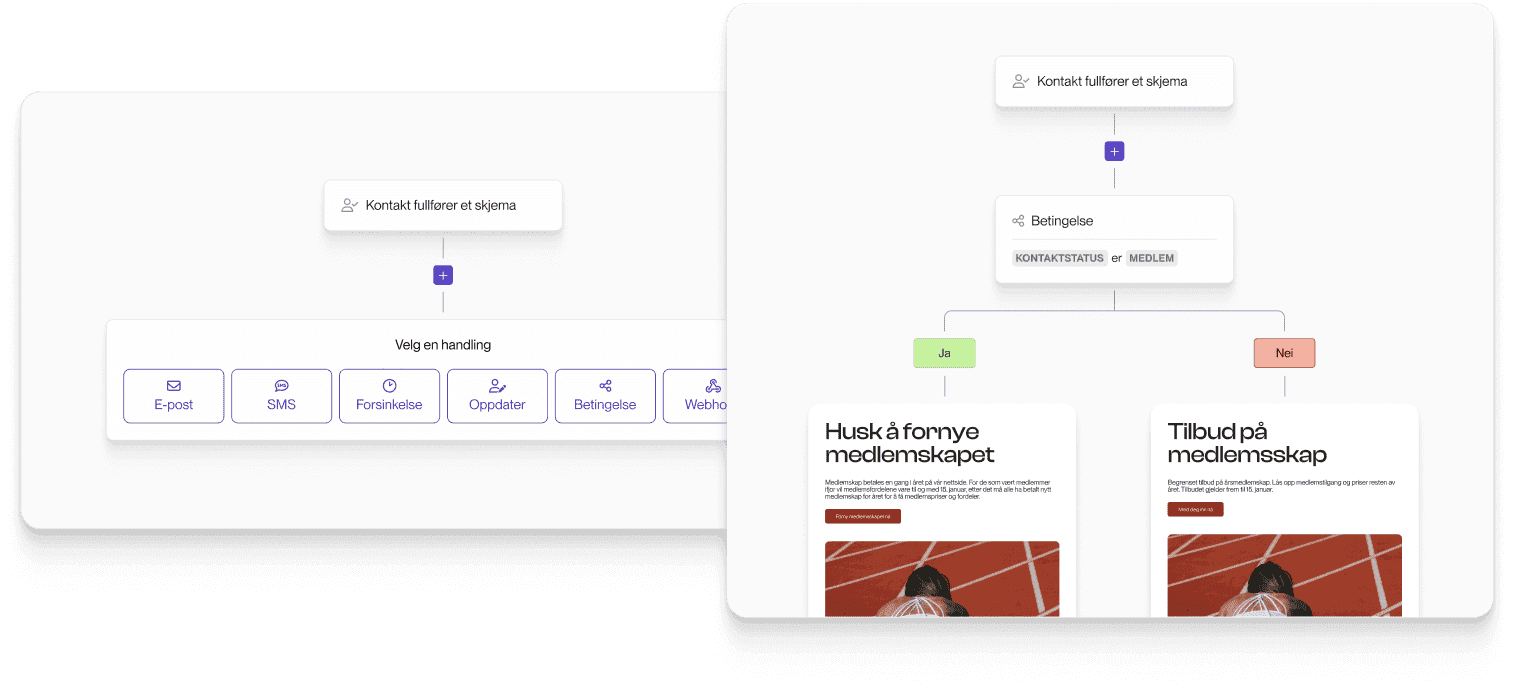
4. Dynamic content: Personalisation without duplication
Does creating more segments mean more work because you have to design a newsletter for each segment?
No. This is where the magic happens: with dynamic content, you can send a single email that automatically adapts to different recipients based on who they are and what you know about them.
The result is more relevant communication without the extra manual work.
Summary: From mass mailings to targeted dialogue
Data collection provides insights about the recipient. Segmentation ensures the right target groups. Automation delivers at the right time. Dynamic content ensures relevant message delivery.
By combining these four elements, you move from mass communication to genuine dialogue. You build relationships, improve results, and save time in the process.
Read more
10 newsletter best practices you should know
There is no doubt that email marketing is effective. However, you may have experienced sitting down to create a newsletter and immediately feeling a bit overwhelmed – where do you actually start? This is perhaps especially true if you are working with a newer brand or product.
The good news is that email marketing has never been easier, and we have gathered 10 excellent newsletter tips to help you succeed. First of all, here are some simple tricks to make your email marketing more effective and impactful:
Keep it short and sweet. People tire of reading long emails. Use between 60 and 200 words.
People love visuals, especially in email marketing. Show images of your products or services.
Back up your claims. Share links or refer to statements from industry experts, positive reviews, or influencers who use the brand.
People want to know where to go next after reading your content. And since emails are usually opened on mobile devices, you must provide a clear CTA (call to action) at the end of each email, whether it leads to a product page or recently produced content on your website.
In summary
Email marketing remains one of the most effective ways to promote your business, build relationships with customers, and drive sales. Take advantage of the opportunity!
Read more
Why email marketing?
Email is the marketing channel that delivers the highest Return on Investment (ROI) against an existing customer base. The advantage of email marketing compared to other traditional channels is that you see the results immediately. When starting with email marketing, it is important to use software designed specifically for this purpose. With some planning, email marketing will eventually become a natural part of your communication and marketing strategy.
Email is low cost
Sending newsletters is very cost-effective compared to other marketing channels, lowering your acquisition costs. Email marketing is currently the most profitable activity you can run online.
Email has high response rates
On average, 20-25% of all newsletters are opened. Note that there are significant hidden figures here, as email clients with preview panes (such as Outlook, Apple Mail, Entourage, etc.) will load the message even if the recipient does not "open" the newsletter in a separate window or click any links. Approximately 10% of all recipients click on one or more links in the email. Traditional direct mail typically sees a 1% response rate.
Easy to execute - with a user-friendly tool
Make Nyhetsbrev features a drag-and-drop template builder where you can easily pull different elements containing image and text combinations into your email. Then, simply add your text, insert links, and upload images that auto-scale. The goal is to let you easily create professional HTML newsletters without needing design expertise. It could not be simpler.
Email delivers measurable response
After every send, you receive detailed statistics showing who opened the email, who clicked the various links, which addresses bounced (did not work), and who unsubscribed. This is valuable insight that highlights what works and what does not – helping you adjust for next time. Additionally, extracting lists of recipients who clicked on specific offers is highly useful for sales follow-up. Your lists are cleaned automatically as bounced addresses are removed, along with recipients who unsubscribe.
Email is effective for branding
With HTML templates, you can build your brand by uploading images and logos. A useful tip is to create a template matching the style of your website to ensure consistent recognition and a coherent visual identity. Subscribers already have brand awareness, and regular contact adds documented value to your brand.
With email, you can deliver personalized and targeted messaging
Examples of how to use email and newsletters: Build your lists correctly and send newsletters to people you have a relationship with to unlock the opportunity to personalize your emails and send relevant content. Segment lists based on interests and purchase history, and target them with similar offers next time. Amazon.com is an excellent example of this approach.
Read more